.jpg)
Is Webflow a CMS? Yes. Webflow is a website builder, a hosting provider and a CMS, all in one interface. That is what sets it apart most from WordPress or a headless CMS.
In this article, we explain how the Webflow CMS works, what changed in 2026, its limits plan by plan, what it costs since the May 2026 pricing overhaul, and when we recommend it (and when we don't).
Originally published in 2024, fully updated on October 6, 2026.
What is a CMS?
A CMS (content management system) lets you create, edit and publish website content without touching code. Think of it as a database where every field is wired to how your site displays.
You use it for anything that repeats: blog posts, case studies, job openings, product pages, team members, service or location pages.
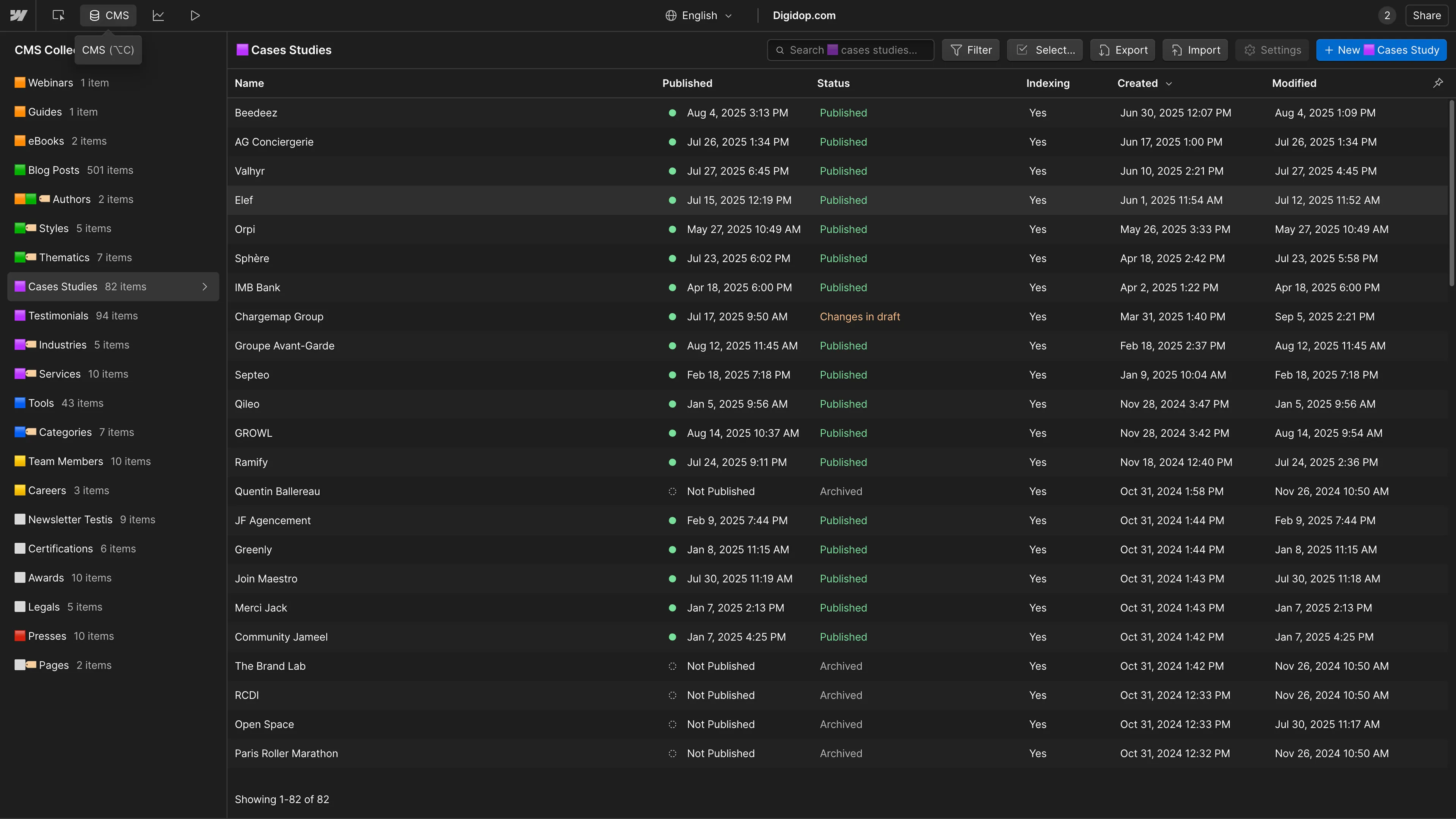
List of published case studies in Webflow CMS with status, indexing, and last modified date.
How does the Webflow CMS work?
The Webflow CMS rests on four building blocks.
Collections and fields
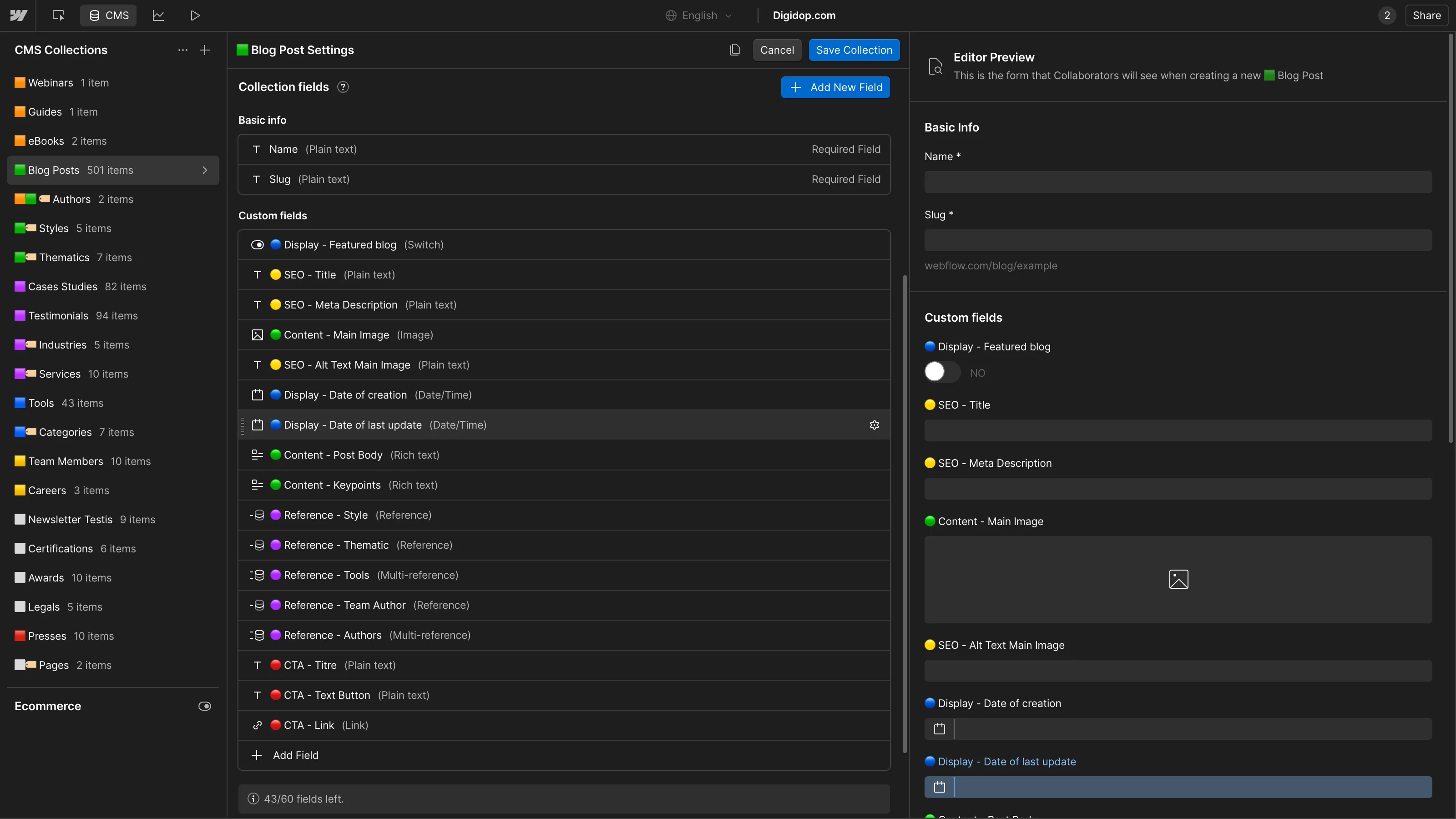
Each content type is a Collection (Posts, Authors, Case studies…). You give it your own fields: plain text, rich text, image, video, link, date, option, color, and reference fields that connect one Collection to another (a post to its author, a case study to its industry).
CMS settings in Webflow with various custom fields for blog post content, SEO, and metadata.
A template designed once
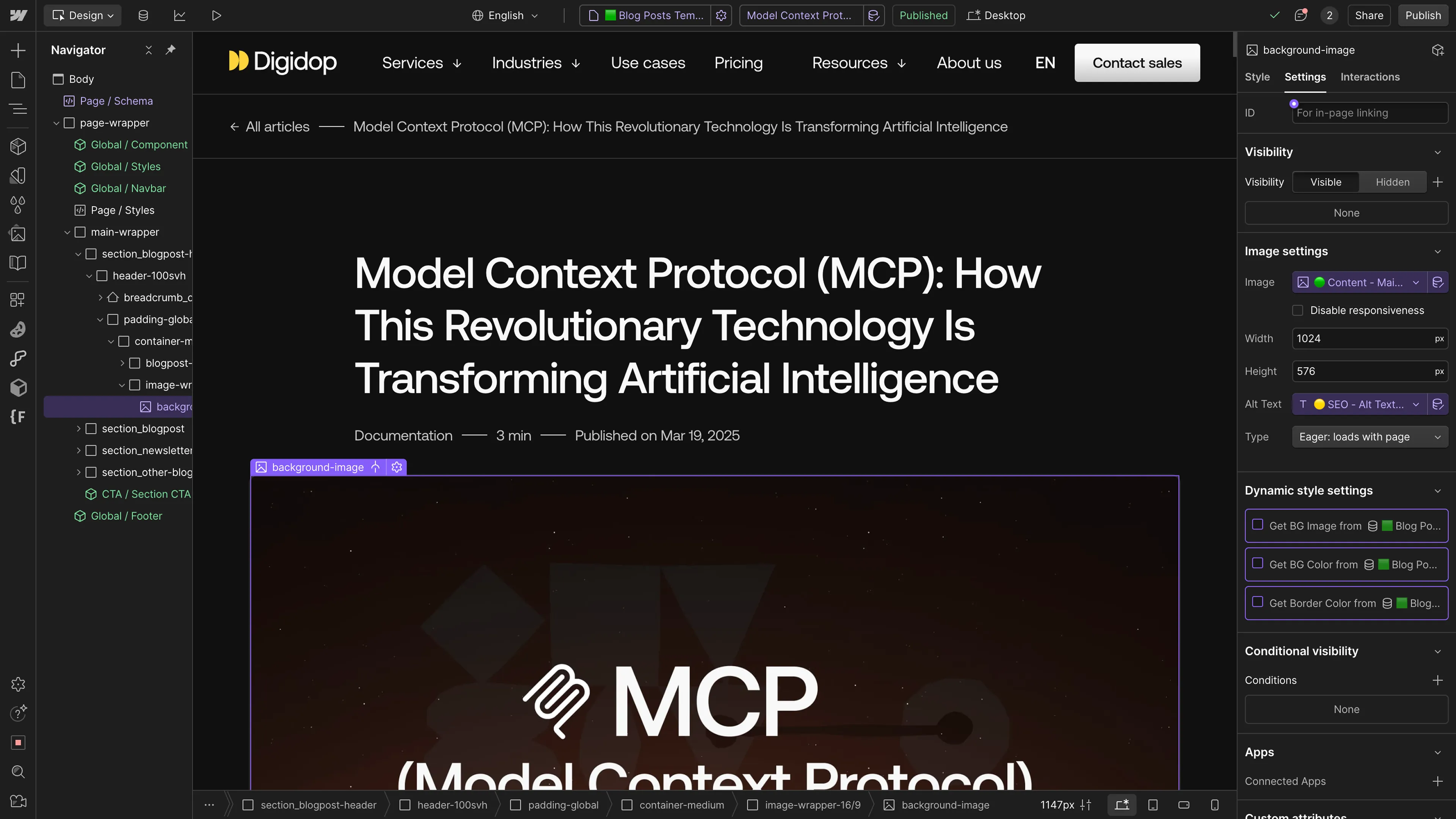
Each Collection has a template page (Collection page). You design it in the Designer, bind each element to a field, and every CMS item automatically gets its own page with that design. You design with real content, not placeholder text.
Blog article interface in Webflow showing title, breadcrumb, and header image with alt text binding.
Dynamic lists anywhere on the site
Collection lists display your content on any page: the latest three posts on the homepage, case studies for one industry, the members of a team. They can be filtered and nested.
Editing and publishing without a developer
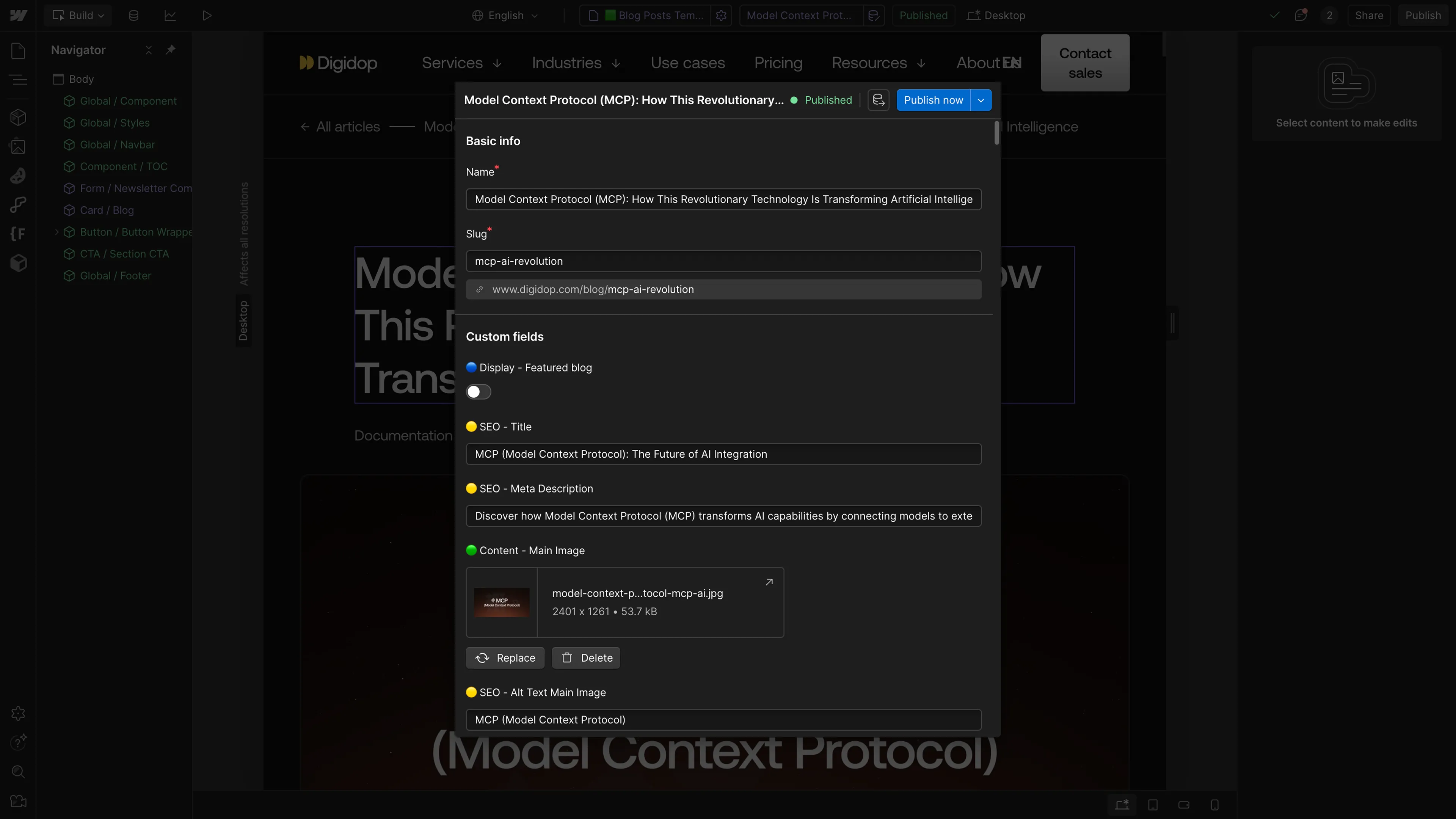
Your team adds and edits content from the CMS panel or right on the page. They can publish a single item without republishing the whole site, or schedule it for a given date.
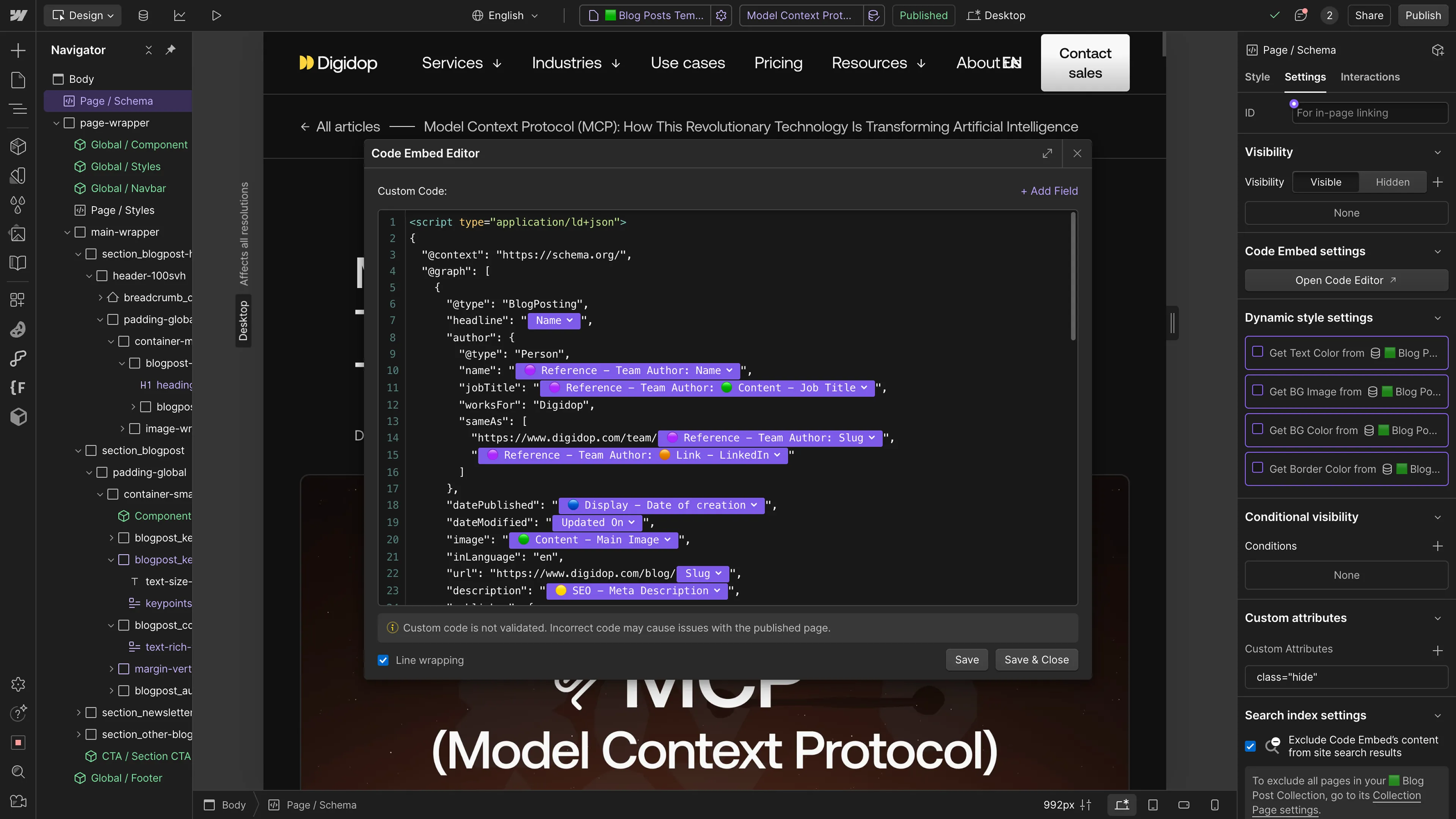
CMS fields can also feed custom code, for example JSON-LD structured data for each post.
What changed in the Webflow CMS in 2026
It has been a busy year for the CMS, and several changes directly affect the teams who publish.
- Webflow rebuilt its CMS architecture. Since April 9, 2026, every site runs on it: up to 10 nested lists per page, 100 items per nested list, and three levels of nesting instead of one.
- Since September 2, 2026, you can drop a component (call-to-action button, testimonial, pricing table) into a rich text field and configure it item by item. Update the component once and every instance follows. Until now, that took custom code or third-party tools.
- The legacy Editor for clients has been gone since August 4, 2026. It is replaced by seats and roles: a Content editor role can edit copy, images and the CMS without touching the design.
- Webflow AI can generate Collection items, one at a time or in bulk. Since May 2026, these features use AI credits included in every Workspace.
- The Webflow MCP server lets an agent (Claude, ChatGPT…) read and edit your site, CMS included, and it comes with every plan. Version 2.1, announced at Webflow Conf 2026, is set to let agents sort and filter on custom fields and search across reference fields.
- With Webflow Localize, CMS content is translated locale by locale, with AI translation. It is a paid add-on on Basic and Premium and included in Team.
- For needs that go beyond a marketing site (an app, an internal tool, a calculator), Webflow Cloud now hosts applications alongside your site, with their own databases. The Premium plan includes up to 15.
More is coming: in September, Webflow unveiled Source, a new platform for marketing teams and their AI agents, with a CMS that can be used headless. It is only in a limited research preview. Our read is in Webflow launches Source.
Webflow CMS limits, plan by plan
These are the limits Webflow publishes on its pricing page, as of October 6, 2026.
| Unlabeled column | Starter (free) | Basic | Premium | Team | Enterprise |
|---|---|---|---|---|---|
| Price | $0 | $15/mo | $25/mo | $2,500/mo | custom |
| CMS | limited | no | yes | yes | yes |
| CMS items | 50 | — | 20,000 | 20,000 (expandable) | custom, up to 1 million per Collection |
| Collections | 20 | — | 40 | 100 | custom |
| Fields per Collection | 60 | — | 60 | 100 | 100 |
| Reference fields per Collection | 10 | — | 10 | 20 | 20 |
| Content management API | 60 requests/min | — | 120 requests/min | 600 requests/min | custom |
Prices in USD, excluding taxes, per site; Basic and Premium billed yearly ($25 and $39 a month billed monthly), Team on an annual contract. Sources: Webflow pricing page; for fields on Starter and Premium, the Webflow Help Center (July 2024 plan update, reference fields); for Enterprise, the January 29, 2026 announcement.
On top of these storage limits, display limits apply on every plan:
- 100 items max per Collection list (beyond that, use pagination or several lists);
- 40 Collection lists per page, including up to 10 nested lists;
- three levels of nesting.
20,000 items leave plenty of room for most marketing sites. The limit to watch is reference fields: a highly connected content model (products, use cases, industries, resources) quickly reaches 10 per Collection. Plan for it when you design the architecture, not afterwards.
Need help structuring your Webflow CMS?
Webflow vs. other CMS platforms
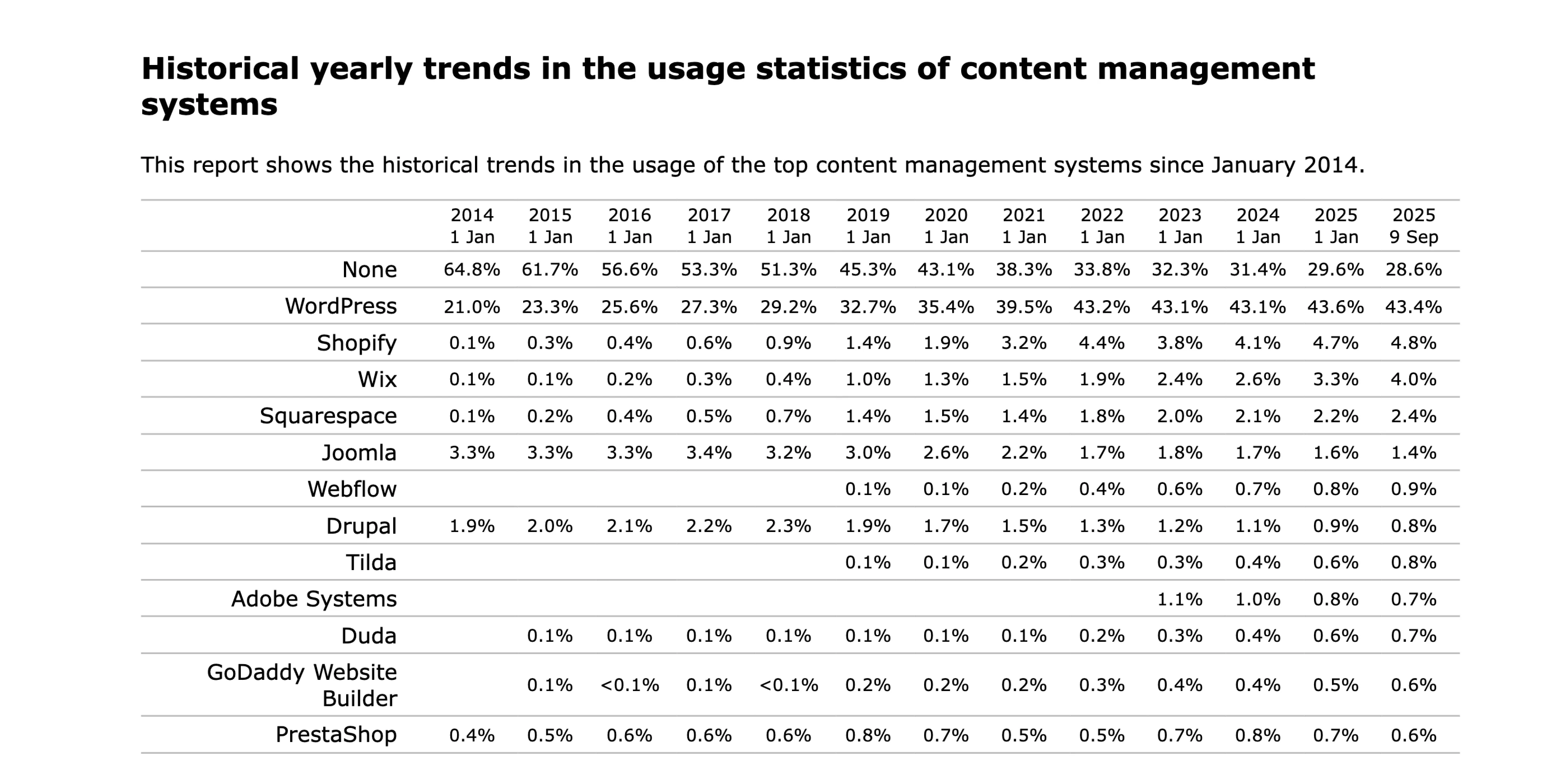
As of October 2026, Webflow powers 0.8% of all websites, or 1.2% of sites using a known CMS, according to W3Techs. WordPress is far ahead, at 40.1% of all websites (W3Techs).
Historical market share of top content management systems from 2014 to 2025, including WordPress, Webflow, Wix, and Shopify. Source: W3Techs
Market share says little about the right tool for your project. We compare them on how you work day to day.
| Unlabeled column | Webflow | WordPress | Headless CMS (Contentful, Sanity, Strapi…) |
|---|---|---|---|
| Approach | design, CMS and hosting in one tool | open-source CMS, theme and plugins to assemble | content only, displayed by a separately built front end |
| Who updates the site | the marketing team, visually | the marketing team, with page-builder plugins | the marketing team for content, developers for the rest |
| Maintenance | no updates to manage, hosting included | core, theme and plugin updates, hosting to choose | front end and hosting to maintain |
| Best for | B2B marketing sites, blogs, resources, case studies | a huge plugin ecosystem, very specific needs | content served across several channels (site, app, other tools) |
If you are weighing several tools, we compare Webflow, Wix and WordPress in more detail.
Why choose Webflow as your CMS?
The strengths
- Design and content live in the same place. You design your templates with real content, and what goes live is exactly what you see.
- The marketing team is autonomous. They publish a post, a case study or a job opening without a dev ticket, and roles keep them from breaking the design.
- There are no plugins or servers to maintain. Hosting (on a global CDN) and backups are included.
- SEO is handled in the CMS: title, meta description, Open Graph, per-item indexing control, sitemap, 301 redirects, and fields that feed your structured data.
- Content is available through APIs, for writing (content management API) and reading (content delivery API), and now to agents through MCP.
The limitations
- On self-serve plans, the limits above are fixed: 20,000 items and 10 reference fields per Collection. Beyond that, you need Team or Enterprise.
- A list only displays 100 items. For a directory or a catalog, plan for pagination or filtering.
- Premium includes 50 GB of bandwidth a month. Beyond that, you pay for add-ons: for example, an extra $20 a month (billed yearly) for 100 GB.
- For a large e-commerce catalog or heavy business logic, other tools, or Webflow Cloud, are a better fit.
How much does the Webflow CMS cost in 2026?
On May 13, 2026, Webflow merged its former CMS and Business plans into a single Premium plan. It is now the entry plan for a CMS on a custom domain:
- Premium: $25 a month billed yearly, $39 billed monthly, with 20,000 items, 40 Collections and 50 GB of bandwidth;
- add-ons, billed yearly: extra bandwidth, Localize (from $9 a month per locale), Analyze (from $9 a month), Optimize (from $299 a month);
- Team: $2,500 a month on an annual contract, with 100 Collections, 10 seats, Localize, publishing workflows and AEO agents;
- Enterprise: custom pricing.
The Basic plan ($15 a month) has no CMS. It suits a site of a few pages that doesn't publish content regularly.
Every plan, seat and add-on is broken down in our Webflow pricing guide, and what changed in May is in Webflow's 2026 pricing update.
Getting started with the Webflow CMS
The tool is easy to pick up. What takes thought is the content architecture, and it is best set before you design the first page:
- List your content types and how they connect (a post has an author and a topic; a case study has an industry and services).
- Count reference fields per Collection: it is the tightest limit.
- Add SEO fields from day one (title, meta description, Open Graph image, alt text) so they get filled in with every post.
- Decide who publishes what, and give everyone the right role.
To learn the basics, we dedicated a free, step-by-step episode of our "Tips de Thibz" series to the Webflow CMS (in French).
Ep 5 : Le CMS | Formation Webflow Gratuite
Our take
For a B2B marketing site, the Webflow CMS is one of the best choices today. It doesn't do everything, but it puts content and design in the hands of the marketing team, with no technical maintenance. That is what matters six months after launch, when you need to publish fast.
The 2026 changes point in the right direction. Components in rich text finally let you enrich a post (call to action, testimonial, table) without code. MCP opens the CMS to AI agents. And the higher Premium limits remove most of the add-ons you used to need.
The catch is the price gap between Premium and Team. A team that needs more than 40 Collections, approval workflows or more than 10 reference fields goes from $25 to $2,500 a month. That is why the CMS architecture deserves thought before you build: well modeled, a site can stay within Premium's limits for a very long time.
If you want help designing that architecture or migrating your content, our Webflow agency can support you.
FAQ
Is Webflow a CMS?
Yes. Webflow is a website builder, a host and a CMS. Its CMS is included in the Premium, Team and Enterprise plans, and in a limited version (50 items) in the free plan.
How many items can the Webflow CMS hold?
20,000 items on Premium and Team, 50 on the free plan. On Enterprise, the limit is set by contract and a single Collection can hold up to one million items.
How much does the Webflow CMS cost?
$25 a month billed yearly on the Premium plan ($39 billed monthly), excluding taxes and add-ons. Team is $2,500 a month and Enterprise is custom.
Webflow or WordPress: which should you choose?
Webflow if your marketing team needs to run the site on its own, with no technical maintenance and a custom design. WordPress if you need a very large plugin ecosystem or hosting you fully control.
Can you use the Webflow CMS headless?
Partly. The content management and content delivery APIs let another application read your CMS. A CMS designed for headless use is part of Source, still in limited preview.
Can a non-technical team edit content safely?
Yes. The Content editor role can edit copy, images and CMS items without access to the design. Site managers can also lock specific elements from editing.