Executive Summary
- Make revolutionizes no-code automation with powerful visual workflows and 2000+ native integrations
- Competitive pricing : from $0/month (free) to $29/month for standard plans, with operation-based billing
- Advanced visual interface enabling complex scenarios with conditional branches, loops and filters
- Premium Zapier alternative with superior technical features and better value proposition
- 2025 innovations : goal-oriented AI agents that automatically build complete automation scenarios
Automate Without Limits with Make
Make revolutionizes the automation approach by offering a particularly sophisticated no-code platform. Unlike traditional solutions, this tool allows users to create complex workflows without writing a single line of code. Formerly known as Integromat, Make has established itself as the leading alternative to Zapier for teams seeking greater flexibility and power.
Make's main strength lies in its ability to handle multi-step automations with advanced business logic. Users can easily integrate conditions, loops, filters, and conditional branches into their automation scenarios. This modular approach enables handling complex use cases that go far beyond the simple "trigger-action" automations offered by competitors.
The platform serves over 350,000 active users ranging from freelancers to Fortune 500 companies, demonstrating its scalability across different organizational sizes and technical requirements.
How Does Make Work?
Make structures its automations around the concept of visual scenarios, where each action is represented by a module graphically connected to others. This canvas interface allows you to visualize the entire data flow and instantly understand the implemented business logic. Scenarios can be triggered by real-time events, hourly schedules, or custom webhooks.
The platform features over 2000 native integrations covering the entire modern SaaS ecosystem. Each connector typically offers more actions and triggers than its competitors' equivalents. For example, the Google Sheets integration enables advanced manipulations including formula management, formatting, and permissions handling.
Key Make Features:
- Visual drag-and-drop editor for building complex workflows intuitively
- Advanced built-in modules : HTTP, JSON, webhooks, data transformers, iterators
- Automatic error handling with intelligent retry and customizable notifications
- Internal Data Store for storing and manipulating data without third-party tools
- Custom functions and variables for precise data processing
- Community templates with 10,000+ pre-built scenarios
- Complete API for integrating Make into advanced technical environments
- Team collaboration with scenario sharing and role management
The 2025 version introduces a major innovation with goal-oriented AI agents. Rather than manually building each step, users define a business objective and the AI agent automatically generates the complete scenario, including module selection, conditions, and appropriate tools.
Make also provides advanced debugging tools with real-time visualization of data flowing between each module. This transparency greatly facilitates troubleshooting and automation performance optimization.
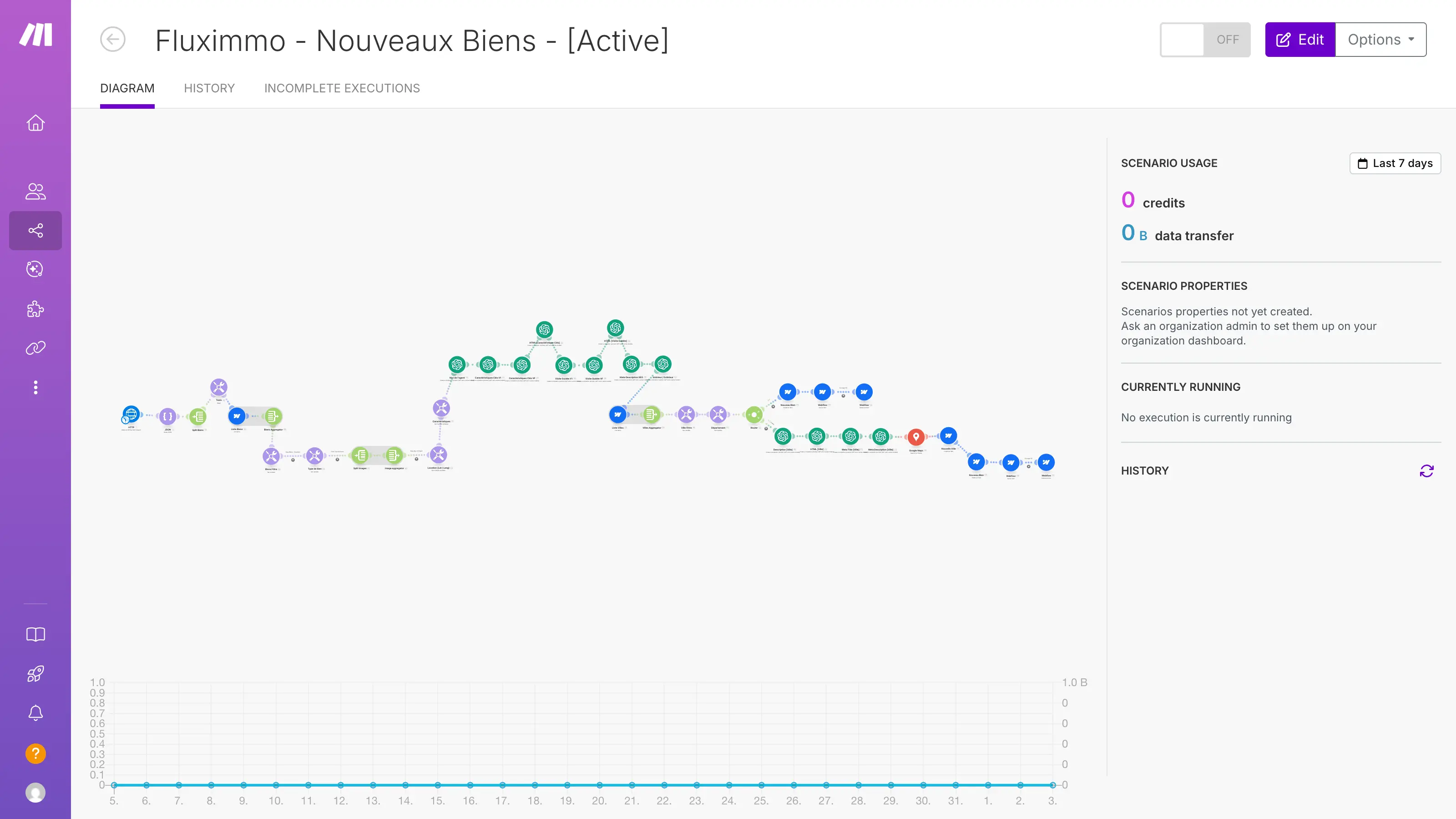
Make workflows are visually represented as sequential modules. The interface is highly intuitive, making it easy to follow along.
Visual demonstration: A complex visual workflow connects modules to manage the import, processing, and distribution of new real estate listings. View the workflow image.
Our Take on Make
Make represents today one of the most mature automation solutions in the no-code market. Its learning curve is admittedly more demanding than Zapier's, but this complexity is justified by infinitely broader possibilities. The tool particularly excels in environments where business processes require sophisticated conditional logic.
The interface redesigned in 2022 significantly improves user experience with colorful gradients and more intuitive navigation. The transition from Integromat to Make was accompanied by substantial technical optimizations, particularly regarding execution performance and integration stability.
The video about Make
The technical support and extensive documentation constitute significant advantages. The Make community, particularly active on Slack, facilitates mutual assistance between users and best practice sharing.
Make Advantages and Disadvantages
Strengths:
- Exceptional value proposition : 10x cheaper than Zapier at equivalent volume
- Superior technical flexibility with ability to integrate custom JavaScript code
- Native JSON and API handling for connecting any web service
- Revolutionary visual interface enabling instant understanding of complex workflows
Weaknesses:
- Demanding learning curve to master all advanced features
- Per-operation billing can surprise if scenarios aren't optimized
- Dense technical documentation that may intimidate non-technical users
Results and Performance with Make
Make's performance metrics demonstrate its operational efficiency in demanding environments. The tool displays 99.9% availability with average response times under 200ms for most standard integrations.
On Capterra, Make scores 4.8/5 based on over 400 verified user reviews, making it one of the highest-rated automation tools on the market. Users particularly highlight the visual editor's power and integration robustness.
Concrete example : A marketing agency using Make to automate their lead generation funnel observed a 340% increase in team productivity while reducing manual errors by 89%. The scenario automatically handles lead attribution, qualification, personalized email sending, and CRM task creation.
Frequently Asked Questions About Make
Is Make truly free?
Yes, Make offers a generous free plan with 1000 monthly operations, 100 MB data transfer, and 2 simultaneously active scenarios. That's 10 times more operations than Zapier and sufficient for seriously testing the platform on real use cases.
What's the difference between an operation and a task?
An operation in Make corresponds to each individual action performed by a module: reading an email, writing an Excel row, API call, etc. This granularity enables precise cost control and fairer billing than traditional "per-task" systems.
Is Make harder to learn than Zapier?
Make indeed requires a larger initial investment to master its visual interface and advanced concepts. However, this learning curve is quickly compensated by infinitely superior possibilities and better long-term scalability.
Can you easily migrate from Zapier?
Yes, Make provides assisted migration tools and equivalent templates for most classic Zapier automations. The active French-speaking community also facilitates support during this transition.
Make Alternatives
Zapier remains the best-known alternative, particularly suited for beginner users who prioritize ease of use. Its integration ecosystem is larger (6000+ apps) but its technical features remain limited for complex use cases.
N8N positions itself as the open-source alternative for technical teams. This self-hostable solution offers maximum flexibility and controlled costs, but requires technical skills for installation and maintenance. N8N excels for organizations that prioritize complete control over their data.
Microsoft Power Automate is a natural choice for Microsoft 365 environments, with advanced native integration of Office tools. This solution particularly suits large enterprises already equipped with the Microsoft ecosystem.
To discover other complementary automation tools, check out our dedicated pages for Zapier, Webflow, and Google Analytics that integrate perfectly in an optimized Make environment.
Discover ou ultime guide to compare Make, Zapier and n8n.
Maximizing Efficiency with Make
Make stands as the optimal choice for teams wanting to surpass basic automation limitations and create genuine automated business processes. Its ability to handle complex workflows with an intuitive visual interface makes it the reference tool for consultants, agencies, and growing SMBs.
The 2025 AI innovations position Make at the forefront of intelligent automation. Goal-oriented agents drastically simplify complex scenario creation, making Make's technical power accessible to a broader audience.
For Digidop teams and our clients, Make constitutes the technological backbone of numerous web projects. Its ability to connect Webflow with the entire marketing and sales ecosystem makes it an indispensable strategic asset. The initial training investment is quickly recouped through productivity gains and reduced repetitive manual tasks.
Sources and Resources
Sources: Make Official Site - Salesdorado Comparison - Wise 2025 Guide
 n8n vs Make vs Zapier: complete comparison to automate your workflows in 2026
 No-code and AI: Accelerate your digital transformation
 Feedback on the NoCode Summit 2022