Add an animated number counter (Webflow)

Tutorial
3 min
Published on Mar 20, 2023
Updated on
Custom code in Webflow and CSS class "counterup"
Use AI to summarize this article
Key points

What is an animated number counter?

An animated counter is the effect that animates the numbers when a user visits your website and reaches the section. This animation will bring a lively style to your website, making it more dynamic and visually appealing to your users.

Below, you can see a GIF of an animated counter that appears on the page when users first access the relevant section of your website.

Animation with dynamic numbers on a Webflow page
Counter animation made in Webflow

How to add the effect to a Webflow site?

Not entirely possible with 100% no-code yet, but we’re sharing the JavaScript with you 😉 Follow this quick guide in just 3 simple steps.

Step 1: Add the code to your page

Copy and paste the following code into the "Before <!-- fs-richtext-ignore --></body> tag" of the relevant page in your Webflow project.

<script defer src="https://cdnjs.cloudflare.com/ajax/libs/waypoints/4.0.0/jquery.waypoints.min.js"></script>
<script defer src="https://cdn.jsdelivr.net/npm/jquery.counterup@2.1.0/jquery.counterup.min.js"></script>
<script>
jQuery(document).ready(function( $ ) {
  $('.counterup').counterUp({
    delay: 100, // the delay time in ms
    time: 2000 // the speed time in ms
  });
});
</script>

Step 2: Create a CSS class

Create a CSS class: counterup and assign it to the HTML element - text block or paragraph - in your project.
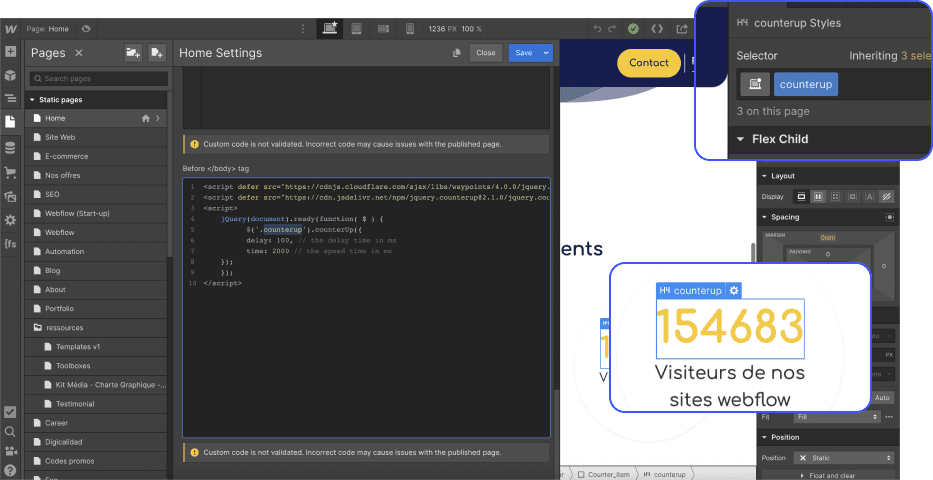
Custom code and CSS configuration in Webflow

Step 3: Publish your site

Publish your site and test the effect live! (The JavaScript code only works when the site is published)

P.S.: Find plenty of other tips and training on Webflow in the Digidop blog!

Florian Bodelot
Florian Bodelot
Co-founder

Suggested articles

Minimalist abstract illustration inspired by Webflow, featuring blue and white geometric shapes on a black background representing Webflow’s 2026 pricing evolution and enterprise AI-driven strategy.
News
Webflow

Webflow Pricing update in May 2026

Webflow Pricing update in May 2026
Live thumbnail featuring Lucas Clairet and Florian Bodelot in the center, with Webflow (blue background) and Claude (orange background) logos behind them, a “LIVE” badge in the top-left, and the text “Webflow + Claude” at the bottom.
Documentation
AI

Webflow x Claude: Full Recap of our Live

Webflow x Claude: Full Recap of our Live
Agent Readiness score result for Digidop showing a score of 100 and agent-native level
Tutorial
AI

Is Your Website Ready for AI Agents?

Is Your Website Ready for AI Agents?

Want to turn your website into your most valuable asset?

Contact us today