A successful website redesign starts long before design and development. It starts the moment you put your needs in writing and share them with your team and your future partners. Keep one thing in mind: if the scoping is vague, the proposals you get back will be too.
At Digidop, we receive a lot of briefs and specifications, whether for private RFPs, public tenders, or smaller projects. And our job often comes down to reading between the lines: spotting the detail a client pushed into the background that, at the scale of the whole project, completely changes the decisions to be made.
How do you know what to prioritize? How do you make sure nothing gets missed? Should you share a budget? How do you set realistic deadlines? And how do you recognize a strong response to an RFP? In this article, we share our expertise and our method, from the client's side, to help you write a brief or a set of specifications that holds up, launch your selection process, and above all, properly assess the responses you get back.
A ready-to-fill brief and specifications template is waiting for you at the end of the article.
Brief, specifications, RFP: what are we actually talking about?
These three words come up again and again, and they're easy to mix up. Here's the distinction:
The brief is a short document, one to two pages, that you send to one or a few targeted agencies. It gets straight to the point: who you are, why you're rebuilding your site, and what you want to achieve.
The specifications are the full, detailed version. They de-risk the project further: a precise functional scope, technical constraints, timeline, budget, selection criteria. It's the reference document throughout the project, and it can serve as a contractual basis in the event of a dispute.
The RFP isn't a document but a process: you put several providers in competition on the same footing. The specifications simply become the document you hand over to the agencies.
A quick note on public tenders: they follow strict rules, with a formal consultation dossier (the DCE in France), a technical proposal, and electronic submission. Here, we're talking about private selection processes, the ones a company runs to choose its web agency. The core logic is the same, minus the administrative red tape.
Why write a brief or specifications document?
Writing this document is a small step that saves you a lot down the line. Concretely, good scoping lets you:
- Get everyone aligned internally, yourself included, on the short-, mid-, and long-term stakes
- Receive comparable proposals, priced on the same basis, instead of quotes that are impossible to line up against each other
- Avoid the costly misunderstandings that crop up along the way, the classic "that wasn't part of the plan" or "I assumed that was included."
Think of it as an investment and a tool to secure the rest of the project.
The agency brief template

The brief comes into play when you reach out to one or two agencies in a targeted way. Concise, clear, goal-oriented. Here are the main sections to cover:
1/ General information. Company name, project name, main point of contact (name, role), contact details.
2/ Company overview. Introduce yourself as if the agency had never heard of you: your activity, industry, value proposition, size, market (B2B or B2C, local or international), main competitors with their links.
3/ Context for the redesign. Why now? An outdated site, no autonomy to edit content, poor performance (SEO, conversion, speed), a repositioning, hiring needs. Be objective and transparent about what isn't working today, it's essential if you want the agency to support you as effectively as possible.
4/ Objectives, in order of priority. This is probably the most important point. Spell out the project's goals: generate more leads, clarify your positioning, modernize your image, make the marketing team self-sufficient, improve your visibility (SEO and GEO). And above all, rank them, because an agency needs to know what matters most to you.
5/ Audiences and users. Who should come to the site (clients, investors, candidates, partners), what their profiles are, your personas or ICP (Ideal Customer Profile), and what they're looking for once they get there.
6/ Functional scope. Describe all the tool integrations and technical features to plan for: CMS and back office, multilingual, forms, CRM, ERP or ATS connections, animations and interactions, responsive design, cookie management (CMP), domain name and hosting.
7/ Inspirations. List sites you like or dislike, and why. Inside your industry or outside it, it doesn't matter. The goal is for the agency to grasp your intent and give shape to what you have in mind.
8/ Constraints. List all your technical, security, and GDPR constraints, your IT infrastructure, the tools or apps to connect, and any internal constraints (IT, legal, brand).
9/ Budget and timeline. Give a budget range. It's a long-running debate and we'll come back to it below, but having been through this situation many times over, hiding your budget mostly works against one person: you. It's essential to state the deadline, but also the ideal kick-off date and, if possible, the key milestones (product launch, trade show, rebranding).
10/ Success criteria. How will you know the project was a success? List performance indicators, expected results at 3, 6, and 12 months, and qualitative criteria such as autonomy or scalability.
A quick note: a brief shouldn't run longer than two pages.
{{custom-blog-cta}}
The specifications template (for your RFP)
-blog.webp)
The specifications document builds on everything in the brief and takes it further. It's the document you attach to your RFP once the project is scoped and you're consulting several providers. To the brief's sections, add the following.
11/ Detailed functional scope. List the specific features expected from the user's point of view ("a visitor must be able to create an account"), page by page if needed. This is what makes accurate pricing possible, rather than a finger-in-the-air estimate.
12/ Technical specifications. Go into more depth by describing the current and target environments precisely: the CMS chosen or to be recommended, the technical integrations with their priority level ("Must have" or "Nice to have"), expected performance, the accessibility levels and standards you want, security features (SSO, log history, roles and access levels, etc.), GDPR compliance, custom hosting, and so on.
13/ Site structure and content. You probably already have an idea of your page structure, and of whether you'll need to redo the content or simply migrate what exists. This is a key point in defining the scope, and one you need to spell out to the agency: who produces the content (you or the agency), reusing existing material, CMS migration, setting up the 301 redirect file, and so on.
14/ Timeline. Plan a work-back schedule with the main milestones and the target go-live date. Depending on the size of the project, it can sometimes make sense to plan for several phases.
15/ RFP terms. Response deadline, expected format, point of contact for questions, selection criteria and their weighting, and the decision timeline.
Our advice: don't lock everything down. A good provider should be able to challenge your choices and propose something better. Overly rigid specifications deprive you of their expertise, and that expertise is exactly what you're paying for.
{{custom-blog-cta}}
Our tips for specifications that actually work
Here's what we often see come across our desk on the agency side, and the reflexes that, for us, make the difference.
1 - Prioritize your objectives
The agency needs to know what's essential to you, so it can weigh the strategic choices it's going to make. You'll get far better recommendations for the strategic decisions ahead of you.
2 - Set up a RACI
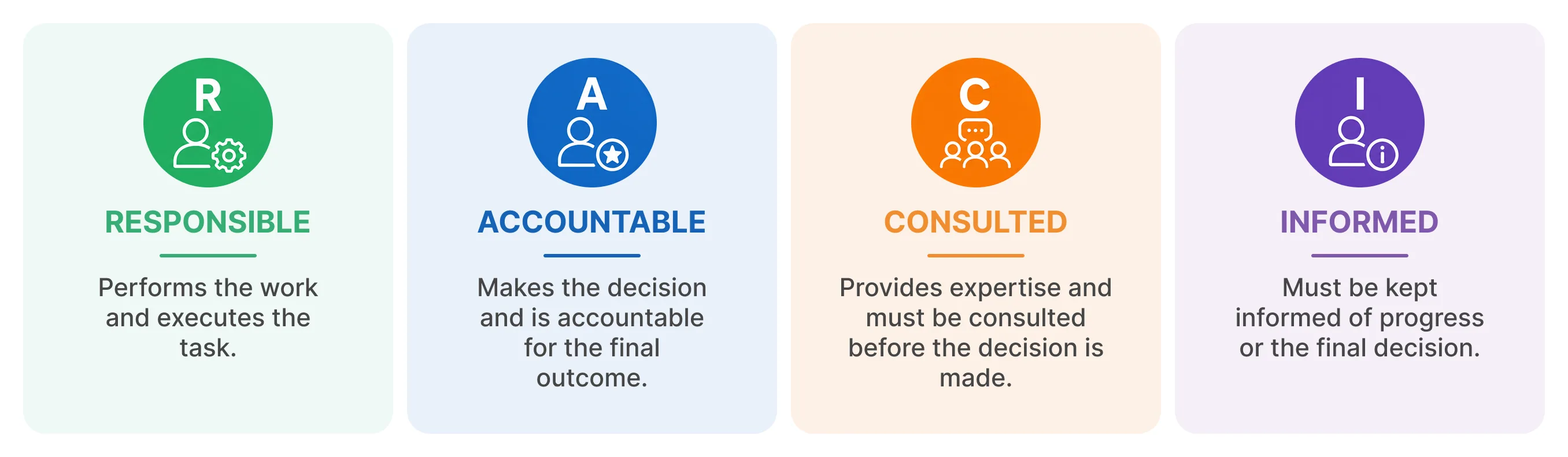
The RACI model clarifies everyone's roles and responsibilities, which is key to a successful collaboration. A simple table is enough to assign these roles across each of the project's major tasks.
3 - Share your budget (or at least a range)
This is THE taboo subject... and yet! Hiding your budget doesn't "protect" you from the price the agency will quote. It just stops them from sizing their proposal properly, and you end up with off-target quotes and wasted time on both sides.
We often hear this: "if I give you a range, you'll spend right up to it." Yes. And more to the point, we won't go beyond it. Because our goal is to work with you. Knowing your budget actually lets us weigh three scenarios:
- It matches what we usually charge for this kind of engagement. We simply align on it.
- It's below. That's where the trade-offs come in. If we want to work together, we look for levers: streamlining certain steps, moving some elements into options, or making a commercial gesture.
- It's above. A good agency uses that headroom to project you into what comes next: extra technical elements, training, AI integrations. That's what separates an agency that has simply bumped up its price from one that has genuinely enriched its value proposition.
One last reflex: build in a 15 to 20% margin for the unexpected. It's the rule, not the exception.
4 - Stay concrete about your objectives
"Increase contact requests by 30% in one year" is always more useful than "have a beautiful site." That said, you need to put those numbers in perspective against your industry's benchmarks and the agency's capabilities.
A tip: ask them for quantified projections of the expected results at 6, 12, and 24 months.
5 - Don't consult fifteen agencies
Sending the same package to as many providers as possible is the surest way to miss the good ones: qualified agencies often turn down mass consultations. Shortlist three, and meet them.
How to assess the responses
You've received three proposals. How do you decide without relying on price alone? We recommend a simple scoring grid: you rate each agency against criteria weighted according to what matters to you.
Three more reflexes:
- Meet the top-rated ones. Now's the time to make room for real interaction. On a project like this, meeting in person lets you check the "soft skills" and the fit between teams.
- Be wary of the cheapest quote. If it's well below the others, either the scope was misunderstood, or part of the work will land back on you later.
- Give feedback to the agencies you don't pick. Responding to a consultation takes time... An honest reply is always appreciated ;)
Brief & specifications template
To save you time, we've put together a ready-to-fill brief and specifications template.
And if you'd rather talk it through directly, get in touch with an expert.
Additional questions
What's the difference between a brief and a specifications document?
The brief is a short document, one to two pages, meant to kick off the conversation with an agency. The specifications document is the full, detailed version that locks down the scope, budget, and timeline, and serves as the reference throughout the project.
Who should write the specifications document?
The client, because they're the one who knows their objectives and constraints best. An agency can help you structure it, but the vision has to come from you. Some companies bring in external project-management support (an AMOA, in the French context) for the scoping phase.
Should you state your budget in an RFP?
Yes, at least a range. It lets providers calibrate their proposal and give you an accurate response. Without a budget, you receive quotes you can't compare and you lose time.
How many agencies should you consult?
Three is enough in most cases. Consulting too many providers spreads your efforts thin and scares off the best ones, who often turn down mass consultations.
How much time should you give them to respond?
Count on two to three weeks. A good response takes work, and too tight a deadline penalizes serious agencies.
Public or private RFP, what's the difference?
Public procurement follows strict rules: a formal consultation dossier, a technical proposal, electronic submission, sometimes an electronic signature. A private consultation, the kind a company runs to choose its web agency, is far more flexible. This article covers the second case.
{{custom-blog-cta}}
.webp)

.webp)