.jpg)
Webflow is a platform for building, managing, and optimizing websites.
Initially popularized by the “no-code” trend, the tool has since evolved into a full-fledged professional platform. It’s powerful and feature-rich, which can make its pricing model a bit tricky to understand.
In this article, we break down and explain how Webflow’s SaaS pricing works.
The 3 Main Pricing Categories
To begin with (and this isn’t the easiest part to understand), Webflow’s pricing is structured around three core functionalities.
Site Plans
Site Plans allow you to access Webflow’s platform features (CMS, custom code integration, etc.) and publish your website using Webflow’s hosting on your own custom domain. They are split into two main categories: Standard (marketing) sites and eCommerce sites. The right plan depends on your needs.
👉 Prices for standard sites vary based on features, site size, and traffic/bandwidth
👉 Prices for eCommerce sites vary based on product volume and transaction fees
Add-ons
On top of these plans, Webflow provides optional paid features for more flexibility.
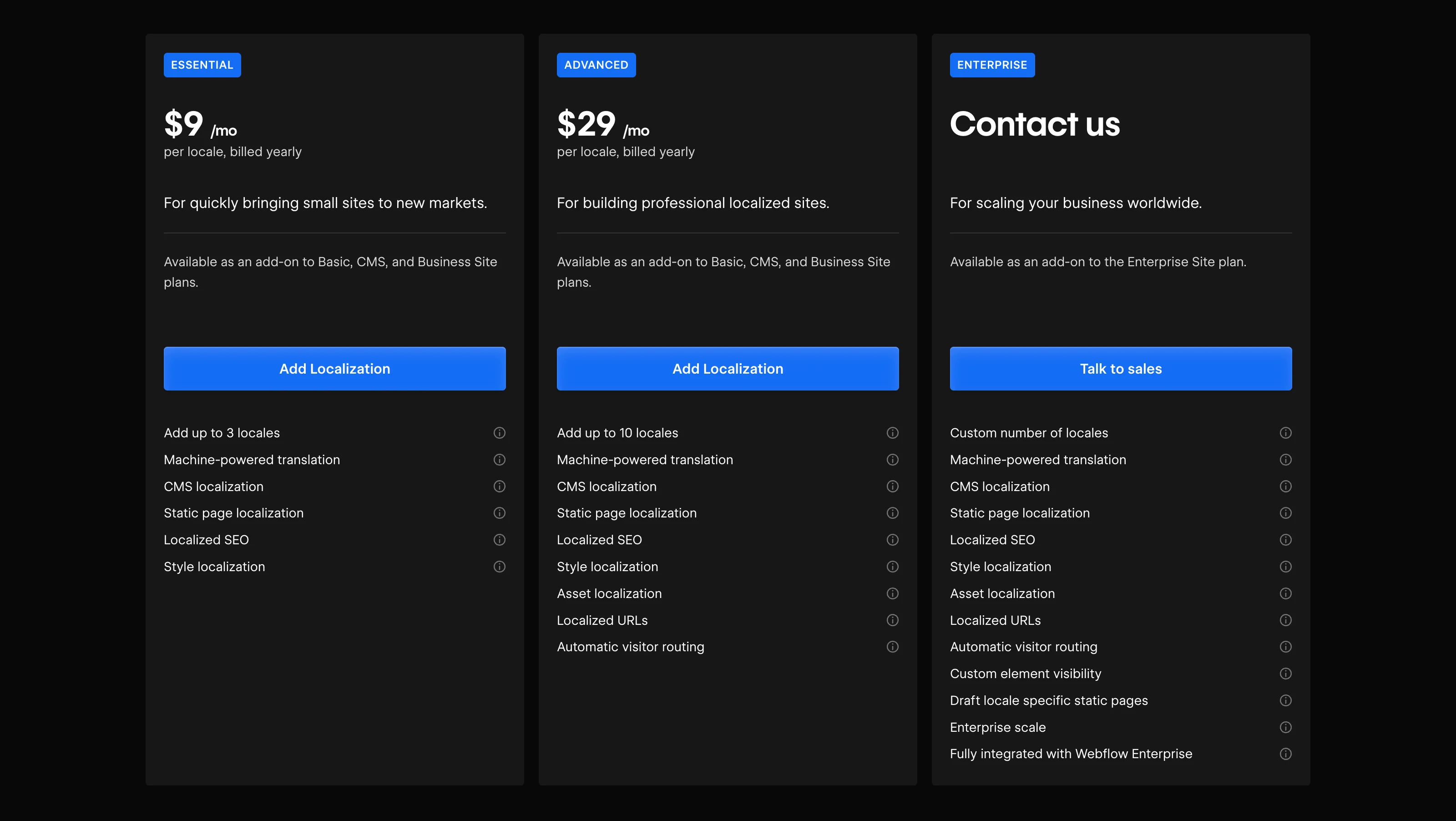
Add-ons include tools like Localization (priced per locale), Analyze, and Optimize.
Since May 2026, Webflow has also introduced an AI credit system within its Workspaces. Some AI features now consume credits, which are included by default in certain subscriptions.
Workspaces
Often misunderstood, Workspace pricing does not include site hosting on a custom domain. Workspaces are designed only to unlock collaborative features. For example, thanks to a role-based system, multiple people can work simultaneously on the same project.
Detailed Comparison of Webflow Pricing in 2026
⚠️ Webflow is a professional tool that often requires support from an agency or freelance expert. The prices below only cover the platform itself and are usually combined with service fees.
Site Plans (for standard websites)
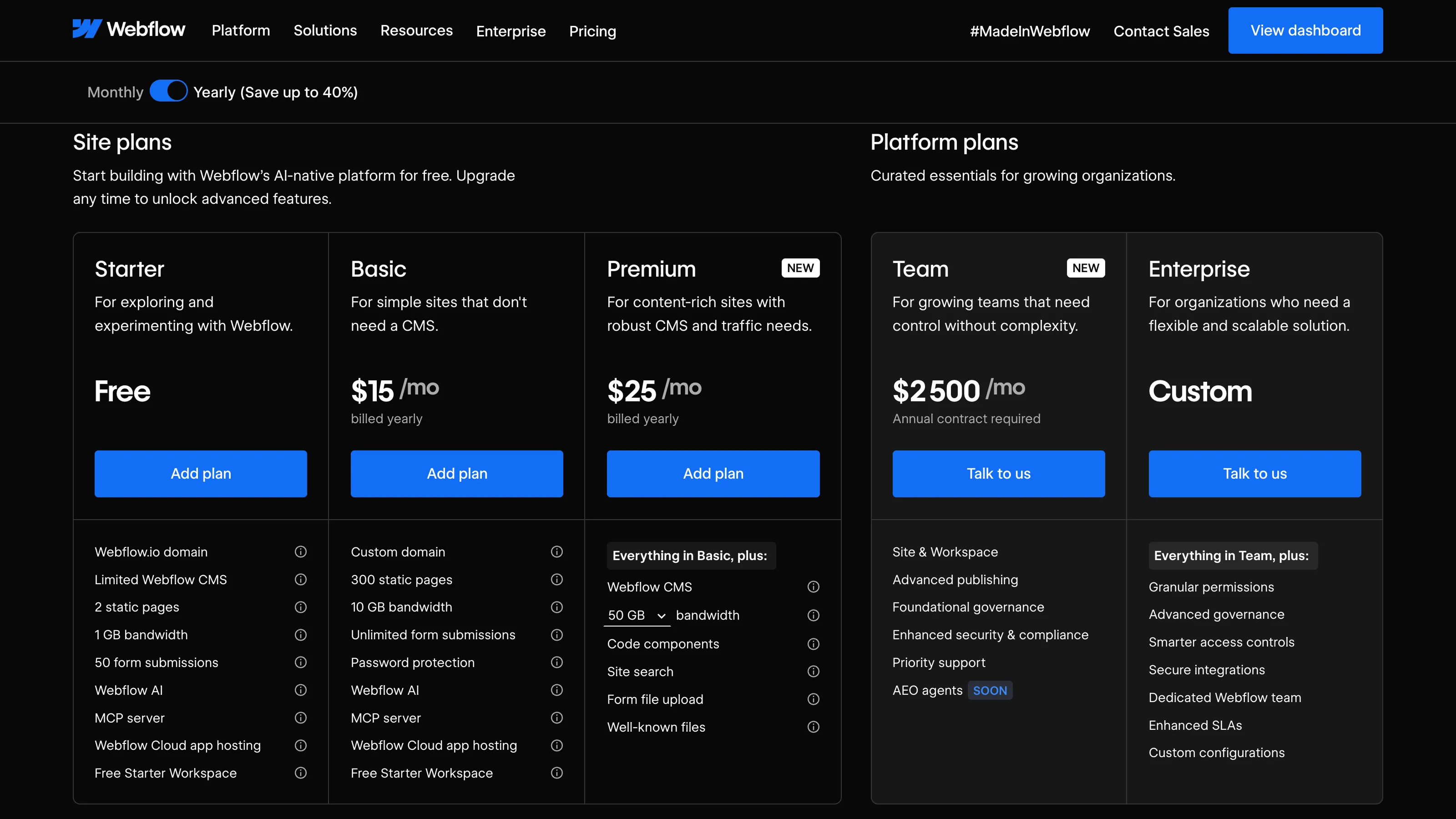
Site Plans are tailored for standard, non-eCommerce websites. Webflow now offers multiple Site Plans adapted to different project maturity levels, from simple showcase websites to full Enterprise needs.
Starter Plan – Free
The Starter Plan lets you test the tool and start creating your site without paying. You won’t have access to all features — CMS access is limited — but it’s a good way to get started. You can publish a site, but only with a .webflow.io domain.
- Webflow.io domain
- 50 CMS items for testing
- 2 static pages
Basic Plan – $15/month
($25/month if billed monthly)
The Basic Plan is Webflow’s first paid plan. It doesn’t include CMS features and is really intended for very small static websites like landing pages.
It’s not ideal for building a long-term content or visibility strategy, but it works as a basic showcase to send to prospects or test an idea.
- Custom domain
- 0 CMS items
- No Webflow branding on your published site
Premium Plan – $25/month
($39/month if billed monthly)
The new Premium plan merges the former CMS and Business plans into a single, more complete offering. It gives access to advanced Webflow CMS features while significantly increasing the default included limits.
This plan is designed for marketing websites, SEO strategies, blogs, and projects requiring a robust CMS.
- 50 GB included bandwidth
- 40 CMS collections
- 20,000 CMS items
- 300 static pages
- Bandwidth add-ons available
Team Plan – starting at $2,500/month
The Team Plan is a new offering introduced by Webflow in 2026. It sits between self-serve and Enterprise plans and targets growing marketing teams that need advanced collaboration, governance, and publishing workflows.
The plan notably includes:
- 10 seats (5 full seats and 5 limited seats)
- Included Localization (2 locales)
- 100 CMS collections
- Page branching
- Publishing workflows
- AEO agents
- Activity logs
- Advanced security features
Enterprise Plan – Custom pricing
The Enterprise Plan is Webflow’s highest-level custom offering. It removes many platform limits and is co-built with Webflow’s team to match your exact needs. No public pricing is available for this plan.
The Team Plan now acts as an intermediate layer before Enterprise.
Site Plans (for eCommerce websites)
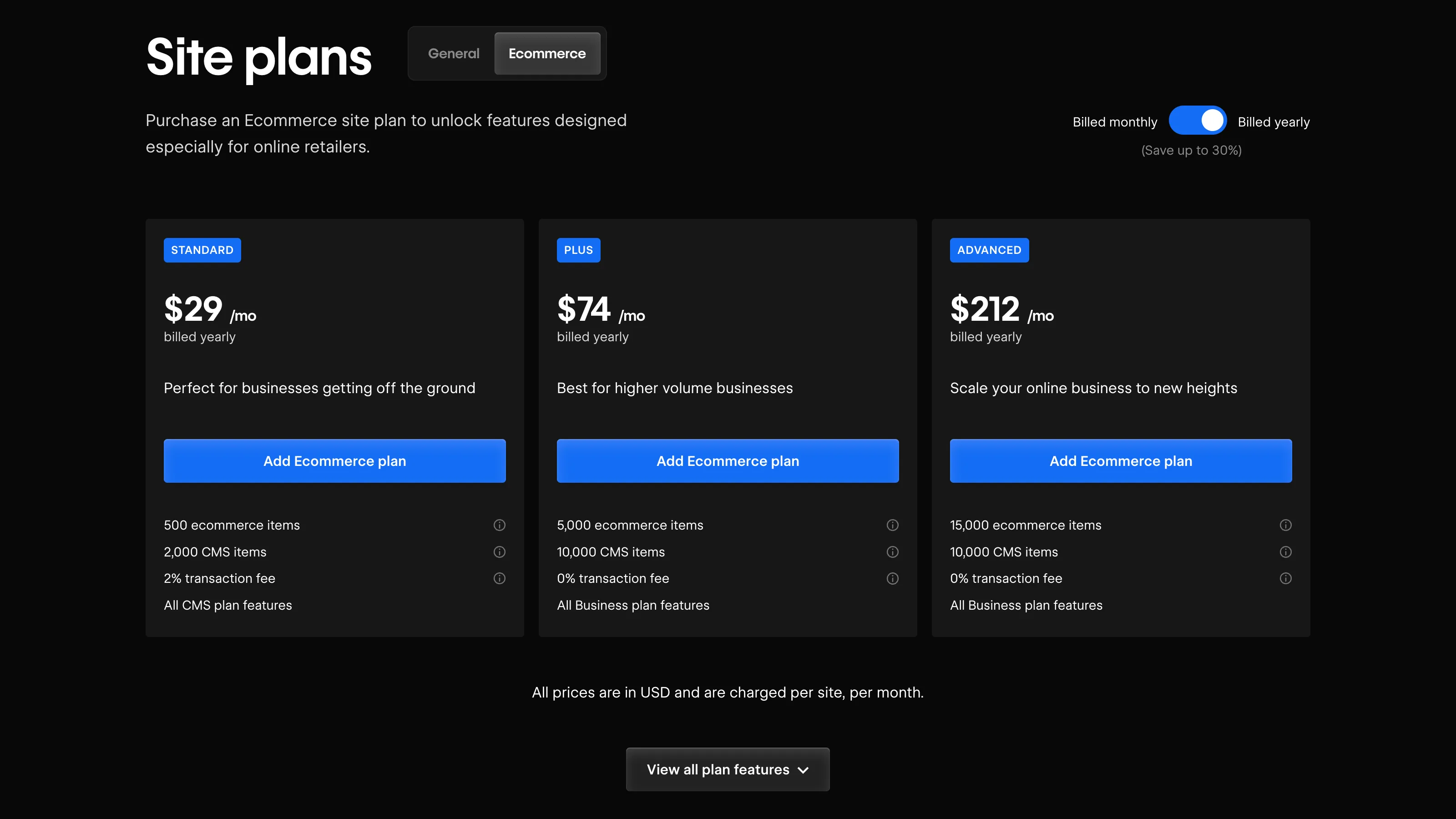
Webflow offers three eCommerce plans — from small shops to large-scale online stores.
Each plan includes essential eCommerce features like:
- Payment systems: Stripe, PayPal, Apple Pay, Web Payments
- Automated custom email notifications
- Automatic tax calculation
- Product categories
- No sales volume limits
Standard Plan – $29/month
The Standard eCommerce Plan includes the Webflow CMS, with lower limits than the Premium plan (2,000 CMS items and 20 collections, versus 20,000 items and 40 collections). It lets you create dynamic content to build product pages. However, you’re limited to 500 eCommerce items and incur a 2% transaction fee per order.
- 500 eCommerce items
- 2% transaction fee
- 2,000 CMS items
Plus Plan – $74/month
The Plus Plan includes the Webflow CMS (up to 10,000 CMS items and 40 collections) and raises the product limit to 5,000. Unlike the Standard Plan, there’s no transaction fee.
- 5,000 eCommerce items
- 0% transaction fee
- Up to 10,000 CMS items
Advanced Plan – $212/month
The Advanced Plan is Webflow’s most robust eCommerce option. It includes every eCommerce feature (unbranded emails, 15 staff accounts) and supports up to 15,000 eCommerce items. No further upgrade is possible beyond this plan.
- 15,000 eCommerce items
- 0% transaction fee
- Up to 10,000 CMS items
Add-ons
These are native Webflow tools that expand functionality without third-party tools:
Localization: Multilingual functionality → from $9/month
Analyze: Track and analyze user behavior → from $9/month
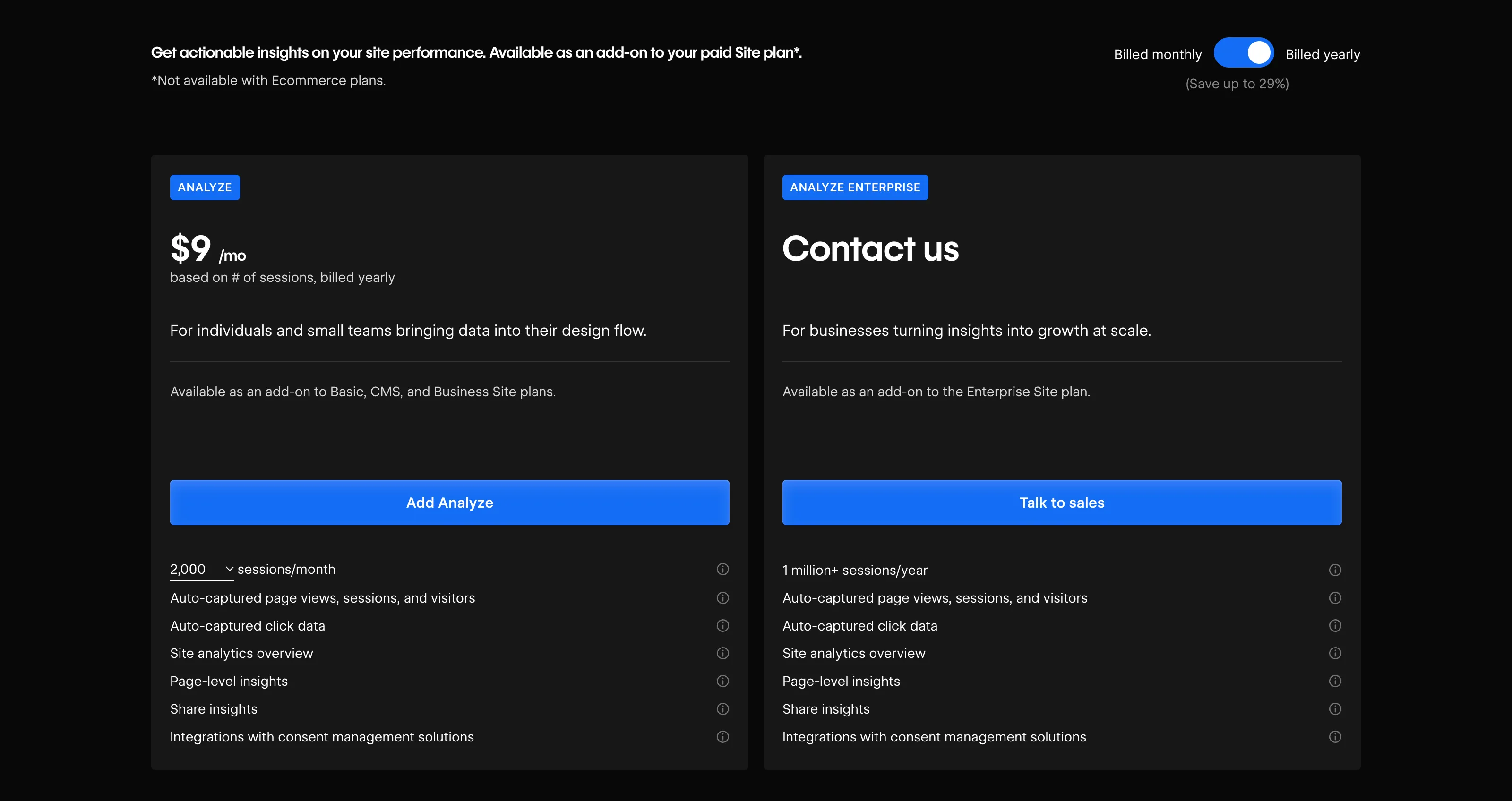
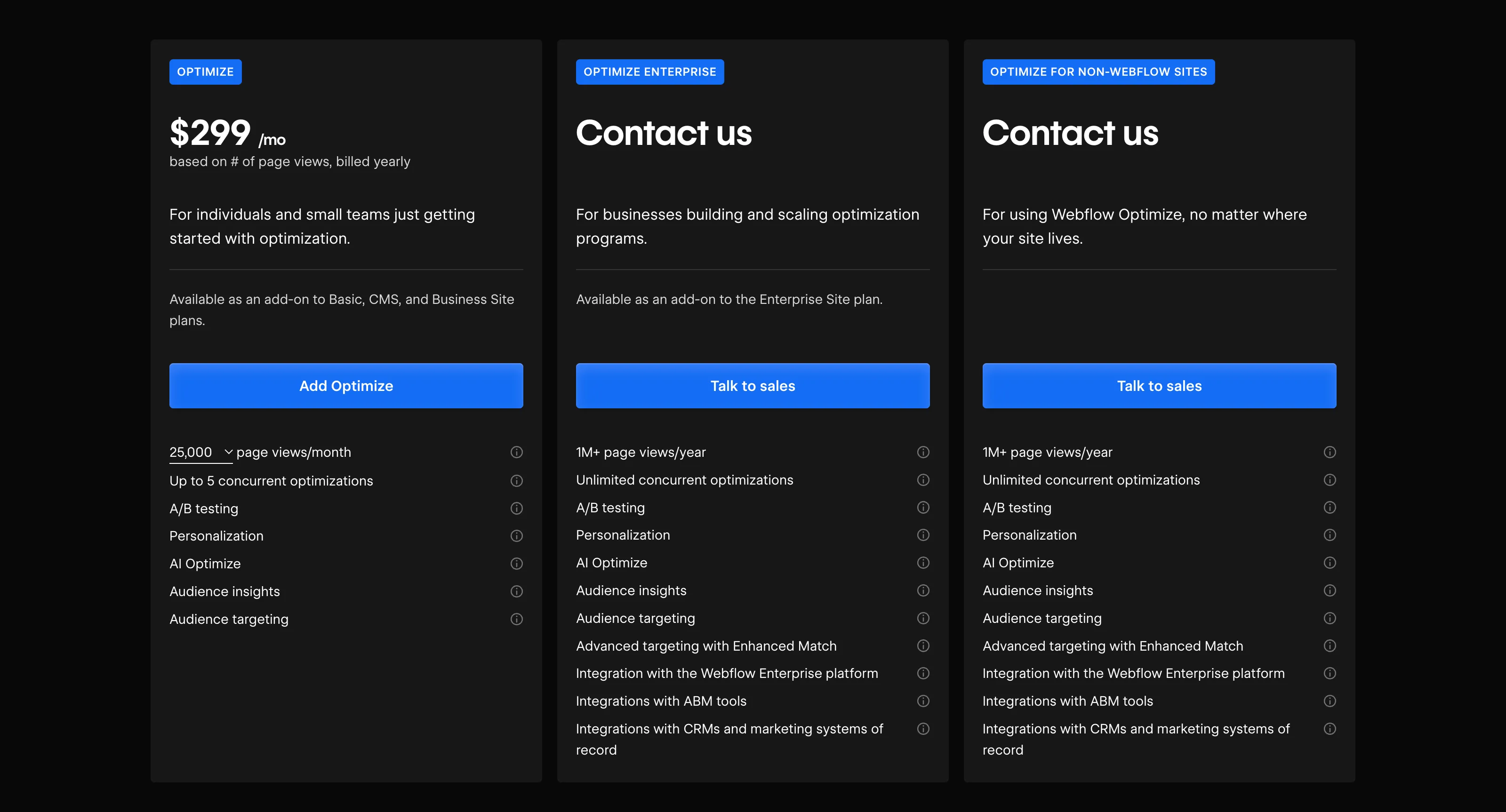
Optimize: A/B testing and personalization tools → from $299/month
AI credits: Webflow’s new AI usage model
Since May 2026, Webflow has introduced an AI credit system within its Workspaces. Some AI features now consume credits, with usage tracking available directly inside the Webflow dashboard.
Credits are included in every Workspace plan, and add-ons can increase limits when needed.
Webflow Workspace Plans
Workspaces are used to unlock advanced features in your Webflow account. They come in two categories:
⚠️ Not to be confused with the new “Team Plan” introduced in 2026, which is an intermediate Site Plan between self-serve and Enterprise.
Workspaces for Teams

Four plans available — from free to Enterprise — depending on:
- Number of unhosted sites
- Access to advanced features (code export, shared libraries, site-level roles, etc.)
Workspaces for Freelancers & Agencies

Two plans are available. They both allow you to access client workspaces as a guest, and with the Agency plan unlocking more features.
- Freelancer: $16/month
- Agency: $35/month
Add Seats (Team Members)
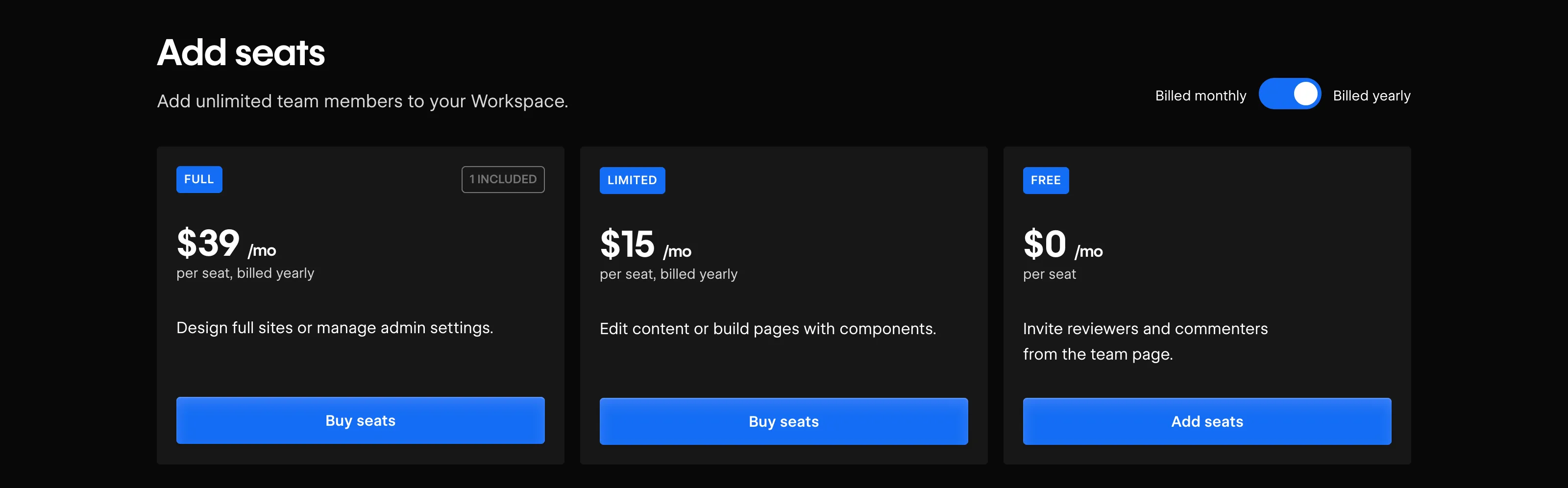
You can add seats to any Workspace plan. Seats allow real-time collaboration between team members on a single Webflow project — this is the real cost of collaborative work. There are two types of seats (added on top of your Workspace plan cost):
- Full seat: full access → $39/month/user
- Limited seat: content editing only (e.g., CMS) → $15/month/user
Overview Webflow Pricing 2026
| Plan | Type | Price | Key Features |
|---|---|---|---|
| Starter | Site Plan | Free | .webflow.io domain, 50 CMS items, 2 static pages |
| Basic | Site Plan | $15/mo (billed yearly) | Custom domain, no CMS, no Webflow branding, 300 static pages |
| Premium | Site Plan | $25/mo (billed yearly) | 40 CMS collections, 20,000 CMS items, 300 static pages, 50GB bandwidth |
| Team | Site Plan | From $2,500/mo | 10 seats (5 full + 5 limited), Localization (2 locales), 100 CMS collections, AEO agents, page branching, workflows |
| Enterprise | Site Plan | Custom pricing | Custom limits, advanced governance, security, workflows, dedicated support |
| Standard | eCommerce Plan | $29/mo | 500 items, 2% transaction fee, 2,000 CMS items |
| Plus | eCommerce Plan | $74/mo | 5,000 items, 0% fee, up to 10,000 CMS items |
| Advanced | eCommerce Plan | $212/mo | 15,000 items, 0% fee, up to 10,000 CMS items |
| Localization | Add-on | From $9/mo | Multilingual support (per locale pricing) |
| Analyze | Add-on | From $9/mo | User behavior tracking & analytics |
| Optimize | Add-on | From $299/mo | A/B testing & personalization |
| AI Credits | Add-on / Usage | Included in every Workspace plan | Credits used for selected Webflow AI features |
| Freelancer | Workspace | $16/mo | Access client workspaces, basic tools |
| Agency | Workspace | $35/mo | More features, shared libraries, roles |
| Full Seat | Seat (Workspace) | $39/mo/user | Full access to design, dev, and CMS |
| Limited Seat | Seat (Workspace) | $15/mo/user | Limited to content editing (CMS only) |
How to Choose the Right Plan?
Webflow offers a wide range of pricing options to meet different project needs. To choose the best plan for your site, ask yourself:
- Do I need a custom domain?
- Do I need CMS (dynamic content management)?
- Do I need to sell products online?
- What’s my estimated monthly traffic?
- Do I need a multilingual website?
And if you are still unsure, our agency offers free discovery calls to help you choose the right plan.
To go further: our full analysis of Webflow’s 2026 pricing update.



.webp)