


Summary
- Markup.io is a visual commenting tool for collaborating on websites, images, PDFs, and videos
- Single pricing of $79/month for unlimited users after removing free plan in early 2025
- Supports 30+ file formats with advanced annotation features
- Particularly suited for creative agencies and web development teams
- Integrations with project management tools and real-time notifications
What is Markup and Why Use It?
Markup.io is a visual commenting platform that revolutionizes how teams collaborate on creative projects. This solution enables contextual feedback collection directly on live websites, images, PDFs, and videos, eliminating email back-and-forth and client feedback misunderstandings.
The tool primarily targets creative agencies, web developers, designers, and marketing teams that need to streamline their approval process. Unlike traditional methods based on screenshots or vague text descriptions, Markup allows precise element targeting, accelerating the revision cycle by 80% according to the publisher.
How Does Markup Work?
Markup.io offers a simplified approach to visual collaboration through its contextual commenting system. Users can upload a file or enter a website URL, then click anywhere on the element to leave a comment. These annotations become organized discussion points in conversation threads.
The platform integrates advanced annotation tools including highlighters, directional arrows, and geometric shapes to clarify feedback. The system automatically captures contextual technical data such as browser used, screen resolution, and operating system—valuable information for developers during bug fixing.
Real-time notifications allow progress tracking of discussions, while the link sharing system facilitates external stakeholder involvement without mandatory account creation. Invited collaborators can view, comment, and resolve improvement points directly in the interface.
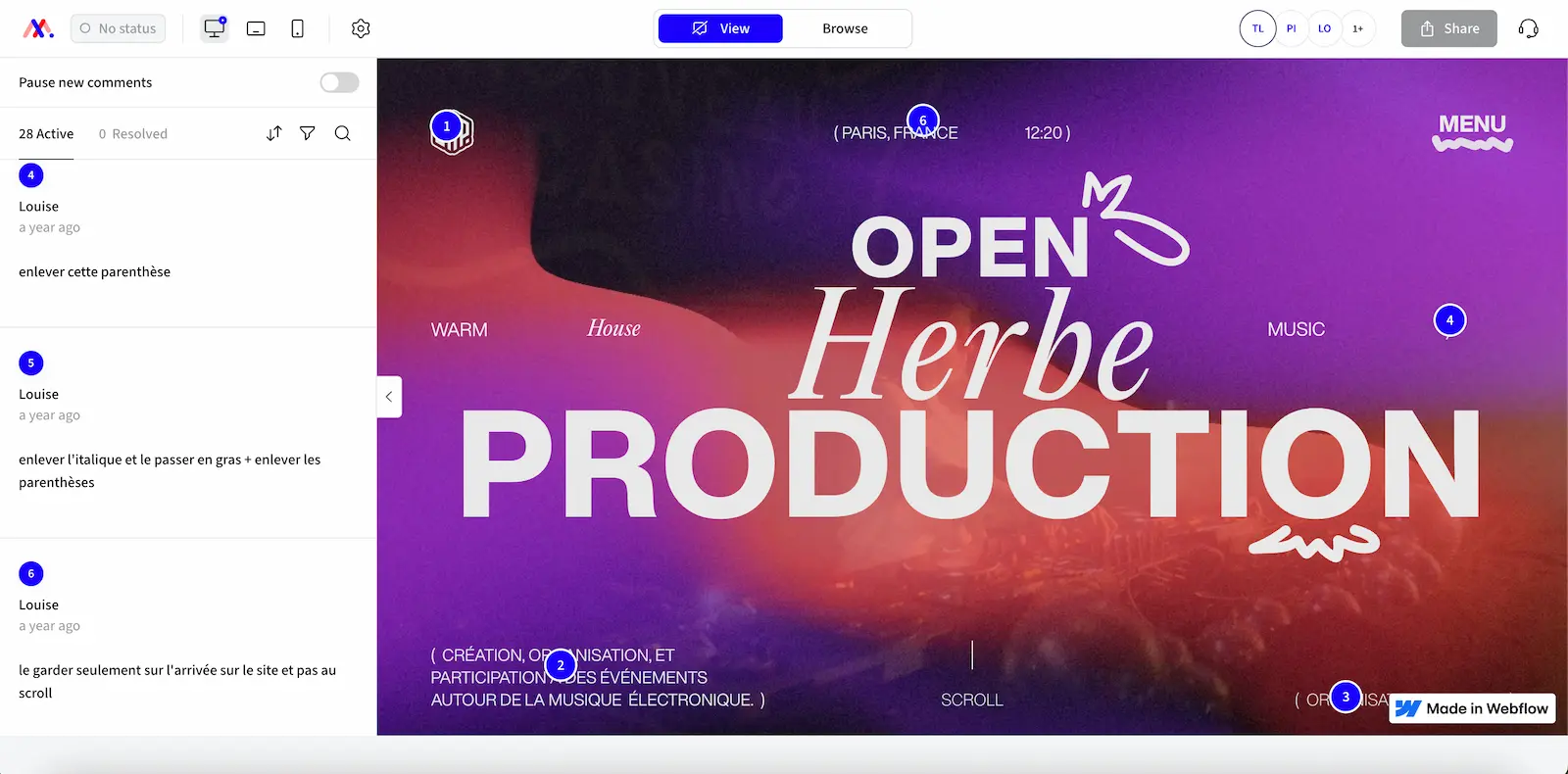
Markup supports 30+ different file formats, ranging from standard web formats (HTML, CSS) to documents (PDF, PowerPoint) and video content (MP4, AVI, WEBM). This versatility makes it a central tool for all types of creative projects.
Key Features:
- Contextual visual comments on websites and files
- Annotation tools with shapes and highlighting
- Automatic technical data capture (browser, OS, resolution)
- Real-time notifications and organized discussion threads
- Link sharing without mandatory account creation
- Support for 30+ file formats (web, PDF, video, images)
- Folder system for project organization
- Integrations with project management tools
Our Take on Markup
Markup.io represents a mature and well-thought solution for teams looking to professionalize their feedback process. The platform excels particularly in its ability to contextualize feedback, avoiding frequent misunderstandings during client validation phases.
The user interface proves intuitive even for occasional collaborators, a significant advantage when involving external clients in the process. Automatic technical data capture constitutes a significant advantage for debugging, allowing developers to quickly reproduce reported issues.
However, the dramatic price increase in January 2025, jumping from $29 to $79 monthly with free plan removal, created ripples in the user community. This 172% increase repositions the tool in a premium range that no longer suits smaller organizations.
"At Digidop, we've been using Markup for 18 months for client validations. The tool greatly facilitates our client exchanges, but the recent price hike pushes us to evaluate more accessible alternatives for our smaller-scale projects" - Thibaut, SEO/GEO Consultant at Digidop
Markup Pros and Cons
Strengths:
- Intuitive interface: Immediate adoption for all user profiles, including clients
- Automatic technical capture: Detailed user environment information (browser, OS, resolution) to facilitate debugging
- Format versatility: Support for 30+ file types covering all creative needs
- Unlimited users: Pricing model based on workspace rather than user count
Weaknesses:
- Prohibitive pricing: $79/month represents a significant investment, particularly for freelancers and small agencies
- Mobile limitations: Reduced mobile functionality, with inability to submit feedback directly from mobile devices
- Limited integrations: Basic connectors with popular project management tools (Asana, Jira, ClickUp)
Results and Performance with Markup
User experience feedback confirms the measurable effectiveness of Markup in optimizing revision cycles. According to collected testimonials, teams observe an average 80% reduction in time spent on feedback exchanges, transforming processes that took several days into interactions of just a few hours.
A concrete use case illustrates this performance: a web development agency reports going from 7 average days per validation cycle to only 1.5 days after implementing Markup. This improvement primarily results from eliminating misunderstandings related to vague text descriptions, replaced by precise visual annotations.
The client adoption rate also proves remarkable, with over 90% of external collaborators spontaneously using the tool after the first presentation. This ease of adoption considerably reduces the usual friction when integrating new tools into existing workflows.
Productivity metrics also show a 60% decrease in meetings dedicated to feedback clarifications, with contextual comments generally sufficient to understand client expectations without additional exchanges.
Frequently Asked Questions about Markup
Does Markup offer a free plan?
No, Markup removed its free plan in January 2025. The tool only offers a 30-day free trial to test features before commitment. This decision accompanies the significant price increase that repositions the tool in the premium market.
How much does Markup cost per month?
Markup's Pro plan costs $79 per month with unlimited users. This pricing includes one workspace, unlimited markups, 500GB storage, and all main features. The Enterprise plan offers custom pricing with unlimited workspaces and advanced security features.
Does the tool work on mobile?
Markup has significant mobile limitations. While comment viewing is possible, creation features and direct feedback from mobile devices remain restricted. This weakness constitutes a barrier for teams requiring complete mobility.
What are the best alternatives to Markup?
Main alternatives include Pastel ($24/month, similar interface), Ruttl ($8/user/month, extended integrations), and Webvizio ($17/month with discount). These solutions offer comparable features with more accessible pricing models for smaller organizations.
Alternatives to Markup
Faced with Markup's price increase, several credible alternatives emerge in the visual commenting tools market. Pastel positions itself as the most direct competitor with a similar user interface and more accessible pricing at $24/month for one user. The tool offers comparable features with a "canvas" system that efficiently organizes projects.
Ruttl adopts a different approach with a per-user pricing model ($8/month) but compensates with extended integrations with popular project management tools (Jira, Asana, Trello). This solution particularly suits teams already organized around a structured tool ecosystem.
For users from our Digidop tool list, Webflow natively integrates commenting features for projects under development, although less advanced than Markup. Figma users can also leverage integrated commenting tools for design phases, creating workflow continuity without additional external tools.
Markup Plans vs Alternatives Comparison
| Feature | Markup Pro | Pastel Studio | Ruttl Team |
|---|---|---|---|
| 💰 Monthly Price | $79 (unlimited users) | $83 (5 users) | $96 (8 users) |
| 👥 Users Included | Unlimited | 5 users | Up to 50 |
| 💾 Storage | 500 GB | Standard storage | 100 GB |
| 🌐 Live Websites | ✓ Complete | ✓ Complete | ✓ Complete |
| 📱 Mobile Support | Limited | Responsive | Responsive |
| 🔧 Integrations | Basic | Slack, Trello | Jira, Asana+ |
| 📊 Free Plan | ❌ Removed | ✓ 3 days | ✓ Limited |
| ⭐ Overall Rating | ⭐⭐⭐⭐ | ⭐⭐⭐⭐ | ⭐⭐⭐⭐ |
Markup in 2025: Premium Tool for Structured Teams
Markup's pricing evolution in 2025 clearly redefines its market positioning. The tool now targets established agencies and enterprises with substantial budgets to optimize their client validation process. For these organizations, the investment justifies itself through measurable productivity gains and professionalized exchanges.
Freelancers and small agencies will find more value in emerging alternatives that offer similar features at more affordable rates. However, for organizations managing multiple simultaneous client projects with large teams, Markup's "unlimited users" model can prove economically interesting.
The tool remains particularly recommended for complex web projects requiring multi-level validations with automatic technical data capture. This technical specialization distinguishes it from more generalist alternatives and justifies the premium for professional development teams.
Sources and Resources
Sources: Official Markup Website - 2025 Feedback Tools Comparison - Annotation Tools Guide
