aria-label is an HTML attribute that gives an element a name when its visible content isn't enough to name it. That name doesn't appear on screen: it's read by screen readers and voice control software. The textbook case is a button that only contains an icon, like a cross or a hamburger.
It's also easy to misuse: put in the wrong place, it hides the visible text instead of adding to it. In this article, we show you the syntax with correct examples, where aria-label doesn't work, how to choose between aria-label, aria-labelledby and aria-describedby, and how to add it in Webflow.
Originally published in 2022, fully updated on October 6, 2026.
What is an aria-label?
ARIA (Accessible Rich Internet Applications) is a W3C specification that adds roles, states and properties to HTML for assistive technologies. The reference version is WAI-ARIA 1.2, a W3C Recommendation since June 6, 2023. Version 1.3 is still a Working Draft (last published June 4, 2026).
aria-label is one of those properties. Its value becomes the element's accessible name: what a screen reader announces, followed by the role. For the button below, it announces something like "Close, button".
<button type="button" aria-label="Close">
  <svg aria-hidden="true" focusable="false" width="24" height="24" viewBox="0 0 24 24">
    <path d="M6 6l12 12M18 6L6 18" stroke="currentColor" stroke-width="2"/>
  </svg>
</button>
The icon has aria-hidden="true": it's decorative, and the name comes from aria-label. This is the example MDN uses.
aria-label in HTML: 4 correct examples
A menu button
<button type="button" aria-label="Menu" aria-expanded="false" aria-controls="main-menu">
  <svg aria-hidden="true" focusable="false" width="24" height="24" viewBox="0 0 24 24">
    <path d="M4 6h16M4 12h16M4 18h16" stroke="currentColor" stroke-width="2"/>
  </svg>
</button>
aria-expanded tells whether the menu is open. Your script must switch it to true when the menu opens. If it stays stuck on false, the screen reader announces a closed menu while it's open.
Two navigation areas on the same page
<nav aria-label="Main">…</nav>
<nav aria-label="Footer">…</nav>
The screen reader already says "navigation": the name is there to tell the two apart. No need to write "Main navigation".
A "Learn more" link
<a href="/services/maintenance" aria-label="Learn more about maintenance">Learn more</a>The name starts with the visible text. That's what WCAG 2.2 success criterion 2.5.3 (Level A) requires: someone who controls their computer by voice says "Learn more", and the link has to respond to that name.
Another option, often a better one, adds the extra words inside the link without showing them on screen:
<a href="/services/maintenance">Learn more<span class="sr-only"> about maintenance</span></a>.sr-only {
position: absolute;
width: 1px;
height: 1px;
padding: 0;
margin: -1px;
overflow: hidden;
clip: rect(0, 0, 0, 0);
white-space: nowrap;
border: 0;
}A search field
The best name for a field is still a visible <label>:
<label for="search">Search the blog</label>
<input type="search" id="search" name="q">
If the design has no visible label, aria-label takes over:
<input type="search" name="q" aria-label="Search the blog">
<button type="submit">Search</button>
The trap: aria-label replaces what's on screen
aria-label takes precedence over the text of a link or button, an image's alt and a field's <label> (MDN). The visible text is then no longer announced at all. It's a common mistake:
<!-- Avoid: the link is announced "Click here", not "Book a call" -->
<a href="/contact" aria-label="Click here">Book a call</a>
<!-- Avoid: the role is repeated ("Close button, button") -->
<button type="button" aria-label="Close button">…</button>
If an element already shows clear text, don't add an aria-label. And never put the role in the name ("button", "link", "image"): the W3C's ARIA practices guide advises against it, since the screen reader already announces the role (ARIA Authoring Practices Guide).
Where aria-label doesn't work
WAI-ARIA 1.2 prohibits naming certain roles: caption, code, deletion, emphasis, generic, insertion, paragraph, presentation, strong, subscript and superscript (WAI-ARIA 1.2). A <div> or <span> without a role has the generic role, and a <p> has the paragraph role:
<!-- Avoid: aria-label is ignored or poorly conveyed on a div, a span or a p -->
<div aria-label="Our services">…</div>
In practice, MDN notes that aria-label is only supported on interactive elements, widgets, landmarks (nav, main, aside…), images and iframes. To title a section, use a visible heading (<h2>), connected with aria-labelledby if needed.
aria-label, aria-labelledby or aria-describedby?
| Attribute | What it does | Use it when | Watch out |
|---|---|---|---|
aria-label | gives a name as a free-text string | no visible text can serve as the name (icon only) | overrides visible text, alt and <label> |
aria-labelledby | builds the name from one or more elements, by their id | the name is already on screen (dialog title, section heading) | takes precedence over aria-label; ids must be unique |
aria-describedby | adds a description, announced after the name | instructions, expected format, error message | doesn't replace the name |
aria-hidden="true" | removes the element from what assistive technologies read | decorative icon, text duplicate | never on an element that can receive focus |
aria-description | adds a description as a free-text string | — | still a draft (ARIA 1.3): use aria-describedby instead |
The browser computes the name in this order: aria-labelledby if present, then aria-label, then the native name (<label>, alt, <legend>, <caption>), then the element's content, and as a last resort title or placeholder (APG). Putting both aria-label and aria-labelledby on the same element is therefore pointless.
aria-labelledby: reuse text that's already displayed
A dialog uses its heading as its name:
<dialog aria-labelledby="dialog-title">
  <h2 id="dialog-title">Book a call</h2>
  …
</dialog>
A link can also combine its own text with its section heading by referencing itself. This is the pattern suggested by the APG:
<h2 id="maintenance-title">Webflow maintenance</h2>
<a id="maintenance-link" href="/services/maintenance" aria-labelledby="maintenance-link maintenance-title">Learn more</a>
The link's name is "Learn more Webflow maintenance", and it starts with the visible text.
aria-describedby: add instructions
<label for="password">Password</label>
<input type="password" id="password" aria-describedby="password-help">
<p id="password-help">At least 12 characters, including a number.</p>
The field's name is "Password"; the instructions are read afterwards. And they stay visible to everyone.
Best practices
- Native HTML first. A
<button>rather than a<div role="button">, a<label>rather than anaria-label. This is the first of the rules of ARIA use published by the W3C (Using ARIA, a document the W3C no longer updates but keeps for its rules). - Visible text next. What's on screen helps everyone;
aria-labelonly helps assistive technologies. - A short name: one to three words is often enough, without the role.
- If the element shows text, the name starts with that text (WCAG 2.5.3).
- A translation for every language on the site: the APG asks for
aria-labelvalues to be translated when the interface is. - Never
aria-hidden="true"on a link, a button or a field. - A test with a screen reader, not just with an automated tool.
Less ARIA is often better than more. The WebAIM Million 2026 found more than 133 ARIA attributes per home page on average, up 27% in one year, and home pages using ARIA had 59.1 detected errors on average, against 42 for pages without. ARIA isn't necessarily the cause of those errors: it's often added to patch badly built components. But it doesn't fix them either.
aria-label and WCAG 2.2
WCAG 2.2, a W3C Recommendation since October 2023, sets outcomes without requiring ARIA. aria-label is one way to meet them, for three success criteria in particular:
- 1.1.1 (Level A): any meaningful non-text content, like a lone icon in a button, has a text alternative;
- 2.5.3 (Level A): the name contains the visible text;
- 4.1.2 (Level A): every user interface component has a name and a role the browser can pass on.
These criteria count in accessibility audits and under the European Accessibility Act, in force since June 28, 2025. We cover that framework (who is affected, which level to aim for) in our article on web accessibility best practices.
How to add an aria-label in Webflow
In Webflow, aria-label is added as a custom attribute, in the element's settings.
- Select the element in the Designer (button, link, link block, icon…).
- Open the Element settings panel (gear icon).
- Under Custom attributes, click +.
- Name:
aria-label. Value: the name, for exampleClose. - Publish, then check the result on the live site.
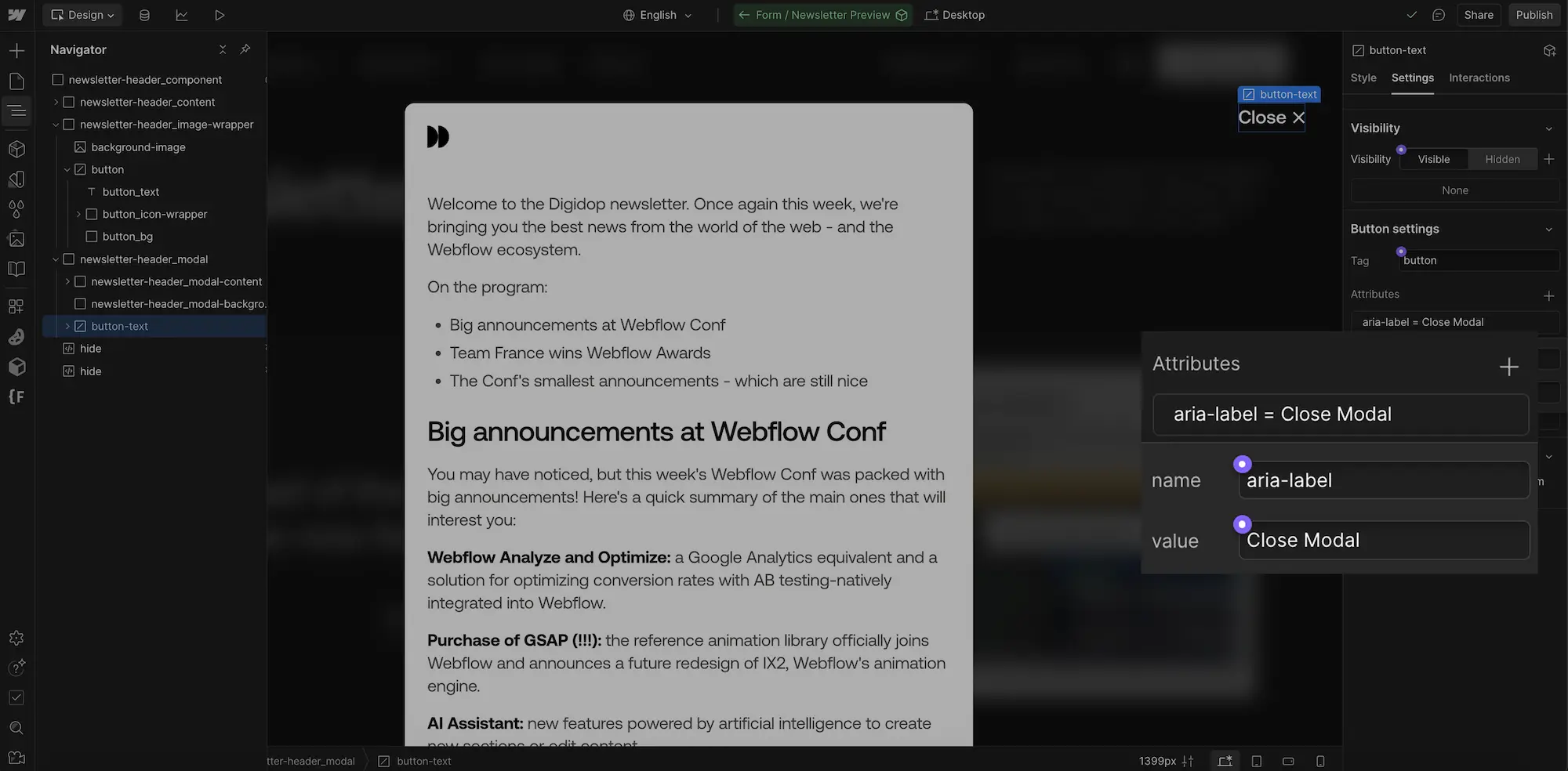
For a decorative icon next to a text, same path with Name aria-hidden and Value true, as recommended by Webflow's accessibility checklist.
Three situations come up often on Webflow sites:
- Social links in the footer that only contain an icon: one
aria-labelper link, with the network's name ("LinkedIn", not "LinkedIn link"). - CMS lists: since March 2023, a custom attribute's value can be bound to a Collection field, including inside a Collection list. Handy for a list of icons whose names come from the CMS.
- Article cards with a "Read more" link: binding
aria-labelto the article title alone would drop the visible text from the name. Instead, add ansr-onlytext inside the link bound to the title field (the CSS class shown above, placed in the site's custom code or in an embed), or make the whole card a link that contains the title.
On a multilingual site, open the published version of each language and check that the aria-label values are translated. A leftover English "Close" on a French page goes unnoticed on screen, but not by a screen reader.
How to test your aria-labels
- In Chrome, the Accessibility tab of the Elements panel shows the computed name of the selected element, under Computed Properties (Chrome for Developers).
- With a screen reader: NVDA, free, on Windows, or VoiceOver, built into macOS and iOS. Tab through the page and listen to what's announced.
- With WAVE or axe DevTools, to find buttons and links with no name.
To go further on choosing the right element: link vs button in HTML.
Our take
We see aria-label as a last-resort fix. On many sites, the problems sit upstream: buttons built with divs, icons with no text, and "Learn more" links one after another. Fix the structure first (real buttons, visible labels, headings) and only a handful of aria-labels are left to add, each with a reason to be there.
In Webflow, the attribute takes seconds to add, but nobody sees it on screen. That makes it easy to forget during an update or a translation. It belongs in the pre-launch checklist of every release, alongside alt text. Accessibility is part of what we build into the sites our Webflow team delivers.
Frequently asked questions
What is an aria-label?
An HTML attribute that gives an element an accessible name, read by screen readers but invisible on screen. It's used when the element has no visible text that can serve as its name, typically a button that only contains an icon.
Should aria-labels be translated?
Yes. The W3C's ARIA practices guide asks for aria-label values to be translated when the interface is. A name left in English on a French page no longer matches what a voice control user says.
What's the difference between aria-label and aria-labelledby?
aria-label holds the name as a free-text string. aria-labelledby points to one or more elements on the page (by their id) whose text makes up the name. If the name is already on screen, aria-labelledby is the better choice. If both are present, aria-labelledby wins.
Can I put an aria-label on a div or a span?
No, unless the element gets a role that accepts a name (for example role="region" or role="img"). Without a role, a div or a span has the generic role, which WAI-ARIA 1.2 prohibits from being named.
Does aria-label help SEO?
No, it's made for assistive technologies. An aria-label stuffed with keywords degrades the experience of screen reader users, with no proven benefit. What helps both accessibility and search is descriptive link text, a clean heading hierarchy and alt text.