On Wednesday, October 21, 2026, the NSA's Cybersecurity Division told every organization running PHP to get ready to update, and added: "If an immediate update is not feasible, it is recommended that organizations take the system offline until it can be fully mitigated." The Wikimedia Foundation, which runs Wikipedia, said it had "taken down a number of other systems as a precautionary measure." Automattic said sites on WordPress.com, WordPress VIP, WP Cloud and Pressable were "already protected against PHP2Shell" (Newsweek). In Europe, governments went further and pulled whole websites offline.
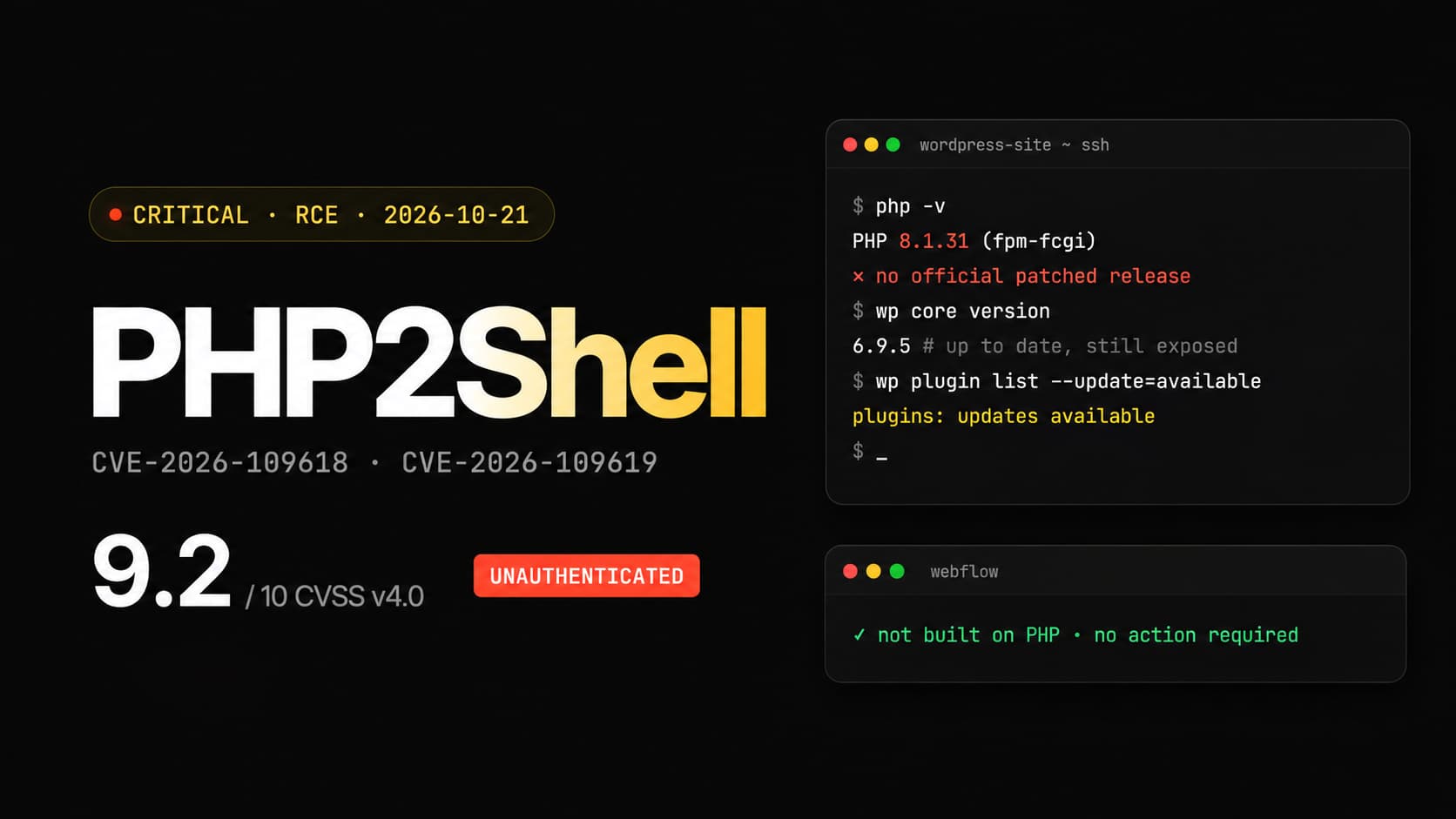
The cause: a flaw in PHP, the language behind a large part of the web. At 14:00 UTC, the PHP team shipped an emergency fix for two critical vulnerabilities nicknamed PHP2Shell. Rated 9.2 out of 10, they let an attacker run their own code on a server, remotely, with no account and no password. PHP runs WordPress, so if your site is on WordPress, it is affected.
In this article, we cover what happened, why updating WordPress is not enough, who has to patch what depending on your hosting, and what to do today. We finish with our take as a Webflow agency on the question many marketing teams are asking this week: should you leave WordPress?
Published on October 22, 2026. The situation is moving fast, and we update this article as official announcements come in.
What happened with the PHP vulnerability of October 21, 2026?
Both vulnerabilities sit in the PHP engine itself, so any site built on PHP is affected, whatever its CMS. According to PHP's official advisory:
- CVE-2026-109618 (OOM corruption): when a server runs out of memory at the wrong moment, PHP can leave half-initialized data behind and later treat it as valid.
- CVE-2026-109619 (stale global state): data from one request can survive after its memory has been freed, and be reused by the next request on the same worker.
Both are rated 9.2 under CVSS v4.0. They affect "all PHP installations serving web requests": PHP-FPM, Apache with mod_php, php-cgi, FrankenPHP and LiteSpeed. The fixed releases are PHP 8.5.12, 8.4.27, 8.3.36 and 8.2.35. PHP 8.1 and older get no official fixed release: the team only published source-code backports for 7.4, 8.0 and 8.1, which you have to build yourself.
| Date (UTC) | What happened |
|---|---|
| August 11, 2026 | Calif reports the first flaw to PHP, followed by OpenAI and Wiz Research (PHP Foundation) |
| October 17 | Amazon spots a first exploitation attempt on its honeypots, four days before disclosure (AWS) |
| October 20, around 15:00 | The CVE identifiers leak online with a wrong 10.0 score. PHP moves the release forward by a day |
| October 21, 07:43 | Cloudflare reports early attacks (Sansec) |
| October 21, 14:00 | PHP ships the fixed releases |
| October 21 | CERT-EU publishes advisory 2026-018, updated later that day |
Outside the US, the shutdowns were broader. France's Interior Ministry put all of its websites into preventive maintenance, Reuters reported, and the tax portal impots.gouv.fr showed a maintenance page. In the Netherlands, the national cyber security centre took its own site down, followed by the government portal Overheid.nl and the Port of Rotterdam. In Germany, Berlin's Charité hospital took its entire website offline (heise). In the US, Newsweek found "no evidence that U.S. federal government websites have been compromised or taken offline because of PHP2Shell."
Sources disagree on real-world exploitation. The PHP security team had identified no functional exploit at release time. Amazon, on the other hand, writes that PHP2Shell "is now being broadly exploited in the wild." The sources we read do not yet document a confirmed break-in on a specific site. Until that is settled, assume the attacks are real.
Why WordPress is affected, and why updating it is not enough
WordPress is written in PHP. Every page of a WordPress site is built by PHP on the server, on every visit (or nearly, if a cache serves the page). According to W3Techs on October 22, 2026, PHP is used by 69.3% of websites whose server-side language is known, and WordPress runs 39.6% of all websites.
The flaw sits in PHP, one level below WordPress. Calif says it achieved unauthenticated code execution on WordPress 7.1.2, and also on Drupal, Joomla, Magento and Laravel. Wiz Research adds, as quoted by Patchstack, that even a simple "Hello World" page on a vulnerable PHP version can be exploited.
WordPress says so itself: "no WordPress update is required or planned" to fix these issues. Keeping WordPress, your theme and your plugins up to date is a good habit, but this week it changes nothing. WordPress maintenance mode does not help either: PHP parses the request before WordPress checks the maintenance flag, as Sansec points out.
Who has to patch what?
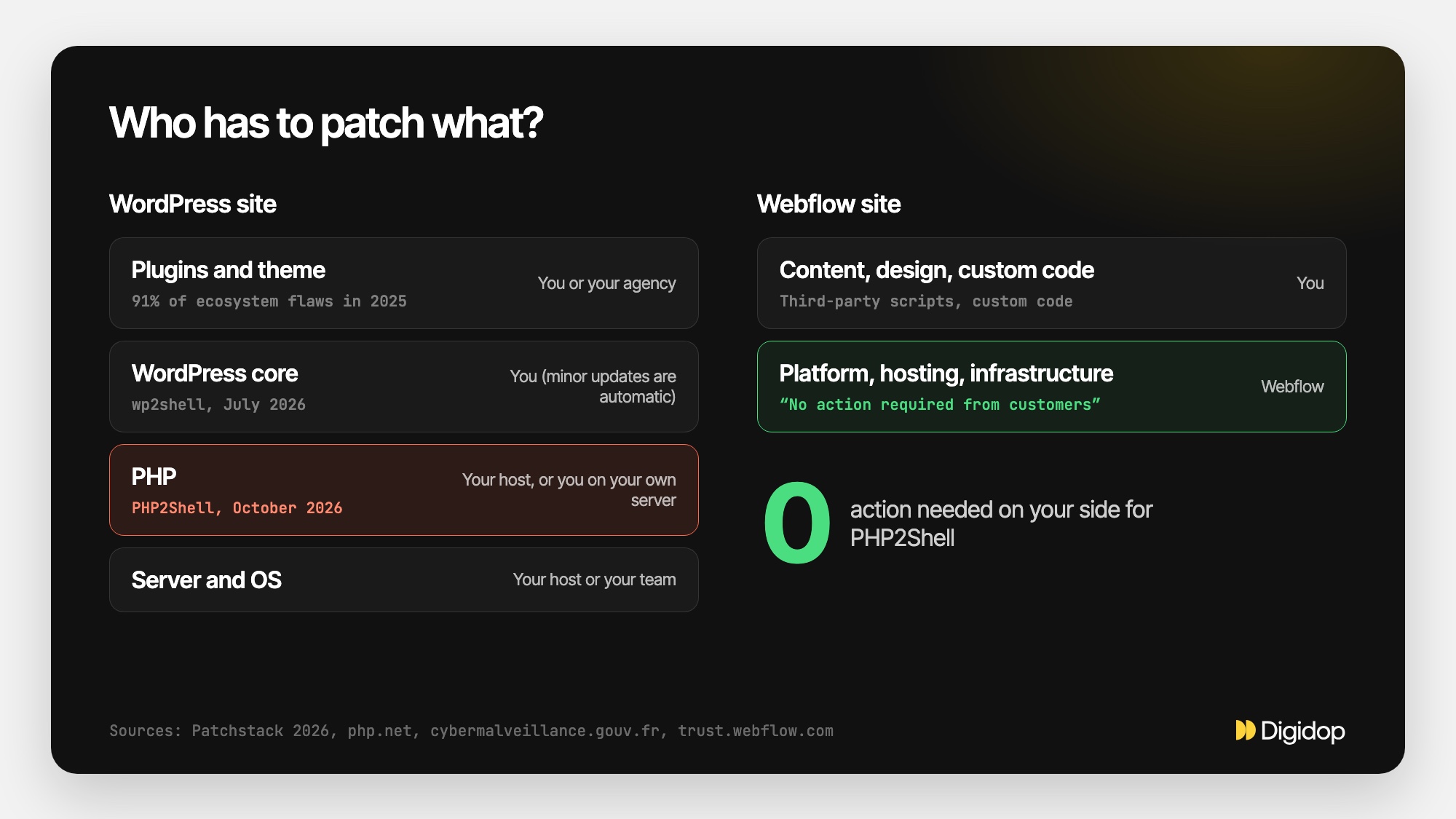
It all depends on who runs your server. That is the first question to answer, and many marketing teams can't.
| Your hosting | Who installs the PHP fix | What you do |
|---|---|---|
| Shared hosting (Bluehost, SiteGround, Hostinger…) | The host | Check your site's PHP version and switch it in the host's control panel if it is too old |
| Managed WordPress hosting | The host or your maintenance provider | Ask them in writing for the installed version and the date of the fix |
| Server run by your team or an agency (VPS, cloud) | You or your provider | Update PHP, restart every PHP worker, review logs from October 17 onward |
| Webflow site | Webflow (no customer-side PHP) | Nothing, according to Webflow's Trust Center |
Another problem: even with a good host, the fix was not available everywhere on October 21. Linux distributions got the patches in advance, but the community-run Remi repository, widely used on Red Hat-family servers, was not expected to have it that day (Rapid7). Your site may have stayed exposed for hours, with nobody on your team able to do anything about it.
More than one WordPress site in three has no patched PHP release to install
WordPress.org publishes the PHP versions of the sites that connect to its servers (to check for updates, for instance). We pulled these public statistics on October 22, 2026:
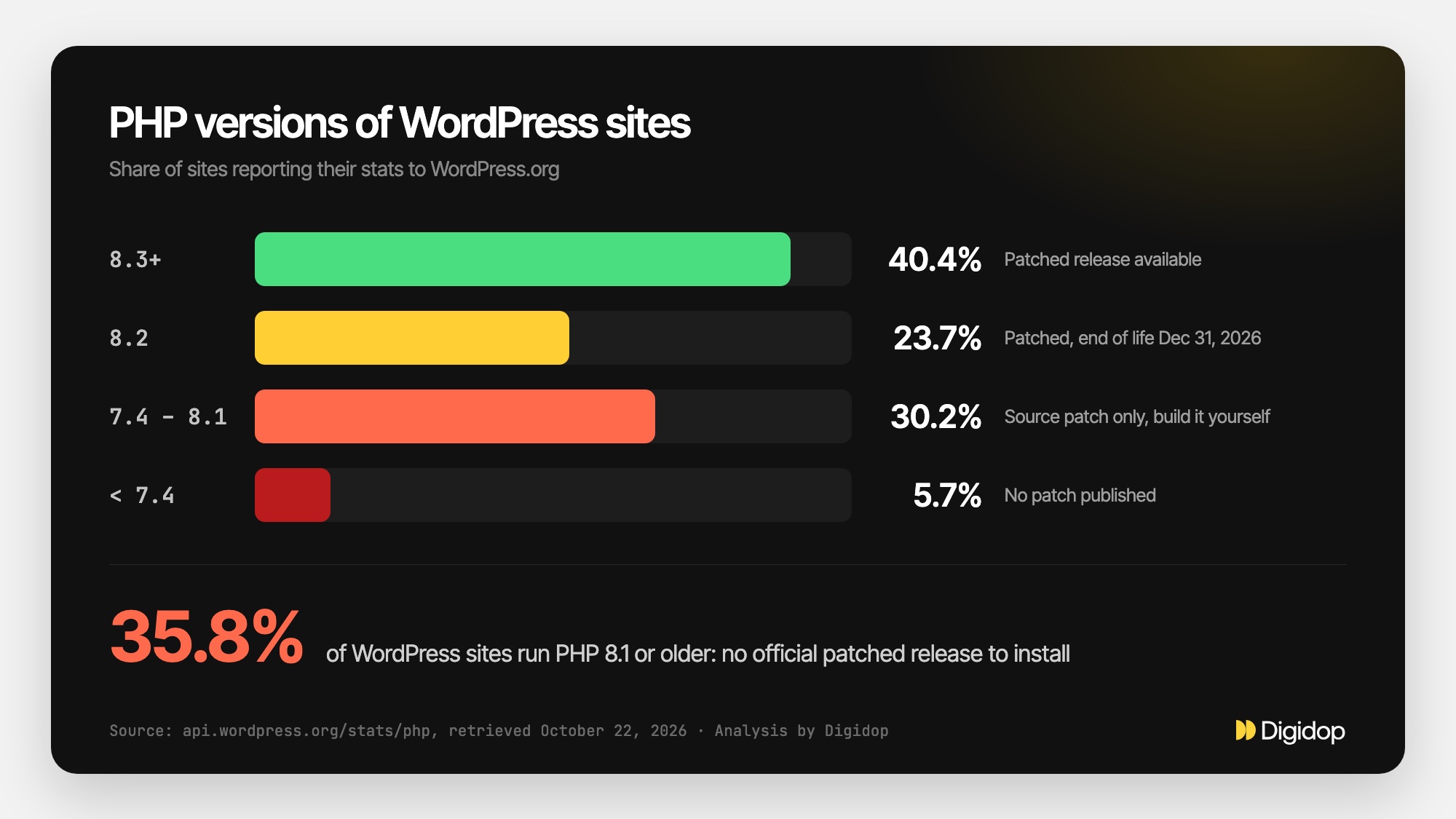
| PHP version | Share of WordPress sites | Status after PHP2Shell |
|---|---|---|
| 8.3 and newer | 40.4% | Fixed release available, provided the host installs it |
| 8.2 | 23.7% | Fixed (8.2.35), but end of life on December 31, 2026 |
| 7.4, 8.0 and 8.1 | 30.2% | No official release, only a source-code backport to build yourself |
| Older than 7.4 | 5.7% | No fix published by PHP |
In total, 35.8% of WordPress sites run PHP 8.1 or older. For them there is no update button to click: the PHP version has to change, which sometimes breaks an old theme or plugin. And in ten weeks, the 23.7% still on PHP 8.2 will fall out of support too.
Two caveats. These figures only count sites that contact WordPress.org, not those that have turned that connection off. And a site on PHP 8.3 stays exposed until its host has installed 8.3.36.
What to do today if your site runs on WordPress
- Find your PHP version. In the WordPress admin: Tools → Site Health → Info → Server. Or in your host's control panel.
- Email your host or provider: which exact version is installed, since when, and is the October 21 fix applied? Keep the answer.
- If you are on PHP 8.1 or older, plan the move to 8.3 or 8.4 this week, testing on a copy of the site first. WordPress recommends PHP 8.3 or greater.
- If you run the server yourself and can't update right away, the temporary settings are listed in PHP's advisory. They reduce the risk without removing it. CERT-EU suggests isolating internet-facing applications until a fix is applied.
- Don't install a "PHP2Shell fix" plugin or a snippet found on a forum. Patchstack warns against these unofficial fixes, and unverified exploit code can contain malware.
- If you see warning signs (unknown admin accounts, modified files, unusual traffic since October 17), treat the server as compromised and rotate the passwords and API keys it holds.
Once you have found your version (step 1), click it to see what it means:
Your PHP version, your situation
Pick the version shown in Tools → Site Health → Info → Server.
If a provider handles your site's maintenance, these checks are part of their job: ask them for a written report.
And if you take the site down while you patch, think about Google. John Mueller, from Google's Search team, advises returning an HTTP 503 status "instead of letting responses time out / 404 / 500" (Search Engine Roundtable). A 503 signals a temporary outage, and your pages keep their place in the index.
A one-off alert or a recurring problem?
Back in July, WordPress fixed wp2shell, two flaws in its own core that allowed a site takeover without logging in (versions 7.0.2 and 6.9.5, released July 17, 2026, Rapid7).
The rest of the time, the risk comes mostly from plugins. In its State of WordPress Security in 2026 report, Patchstack counts 11,334 new vulnerabilities in the WordPress ecosystem in 2025:
- 91% were in plugins, 9% in themes;
- 46% had no fix from the developer at the time of public disclosure;
- for the most heavily exploited flaws, the median time from disclosure to mass exploitation was 5 hours.
Put together, that is four layers to watch: the server, the PHP version, WordPress core, and every installed plugin. This week, the PHP layer was not even in the site owner's hands. Take a marketing site with twenty-odd plugins, maintained by a contractor who left long ago: it carries every one of those risks, and that monitoring work appears in no marketing budget.
Why Webflow sites had nothing to do this week
Webflow published its position on its Trust Center: "Webflow's core services are not built on PHP and are not affected." It adds that it is assessing non-production systems that use PHP, and concludes: "No action is required from customers."
On Webflow, you don't manage a server, a PHP version or plugins. Hosting, SSL certificates and security updates are handled by the platform; Webflow's security page mentions "automated patches and updates with no customer maintenance." The platform holds SOC 2 and ISO 27001 certifications. We cover this in more depth in our Webflow security guide.
Webflow is not invulnerable, and we'd rather say so. Some risks stay on your side:
- Access: an account without two-factor authentication, or seats never removed from former contractors.
- Custom code and third-party scripts (chat, tracking, external forms), which run on your site and are only as secure as their vendor.
- Vendor dependency: you hand one company your hosting, your security and the product roadmap.
What changes is the number of things your team has to watch. On a Webflow site there are few of them, and none depends on a host waiting for a Linux package.
Our take: should you leave WordPress after PHP2Shell?
First, don't migrate in a panic. A migration takes weeks; this flaw gets fixed this week at your host. Patch first, then decide with a clear head.
At Digidop, the first question we ask is simple: who, on your side, looks after the site's security, and what does it cost you? A well-run WordPress site, at a serious host, with few plugins and a provider who answers the same day, is a defensible choice.
We recommend moving to Webflow when:
- your site is a marketing site (service pages, blog, case studies, forms) run by a marketing team;
- nobody internally can tell which PHP version is running, or who installs it;
- the site piles up plugins, half of which are no longer updated;
- every change goes through a developer, and every update is a source of anxiety.
We recommend staying on WordPress, and strengthening its maintenance, when:
- the site is a WooCommerce store with heavy business integrations;
- it carries real application logic (customer portal, calculators, business database);
- you already have a technical team that masters hosting and responds to alerts within the hour.
The first situation matches the B2B marketing sites Digidop builds for finance, tech & SaaS and industrial companies. We go deeper in our articles on the WordPress problems we see most and on the reasons to migrate to Webflow.
Moving to Webflow without losing your rankings or your AI visibility
The main risk of a migration is losing traffic. One forgotten URL, one missing redirect, and pages that used to rank vanish from Google and from ChatGPT or Perplexity answers.
Our Webflow migration process follows five steps:
- an audit of the existing site: pages, content, traffic, plugins and what they actually do;
- CMS architecture and Webflow development;
- content migration and a 301 redirect plan, URL by URL;
- integration of your marketing and business tools (CRM, forms, analytics);
- QA, launch, then 90 days of follow-up.
For blog content, we documented the method in migrating blog content from WordPress to Webflow.
To track rankings and AI citations before, during and after the switch, we work with Vydera, an AI-native visibility agency. They can run your SEO through the migration and measure your visibility in ChatGPT, Gemini or Perplexity, so nothing gets lost along the way.
On budget, a migration to Webflow is in practice a rebuild of the site. Our published ranges start at $10,000–$30,000 for a marketing website, and $30,000–$50,000 for a multilingual site with business integrations and several markets (details on our marketing website offer).
{{custom-blog-cta}}
Frequently asked questions
Is my WordPress site affected by PHP2Shell?
Yes, if it runs a PHP version older than 8.5.12, 8.4.27, 8.3.36 or 8.2.35, whatever your WordPress version. Only your host, or whoever runs your server, can install the fixed release.
Is updating WordPress and my plugins enough?
No. The flaw is in the PHP interpreter, not in WordPress. WordPress says no update on its side is required or planned. WordPress maintenance mode does not protect you either, because PHP handles the request first.
How do I find my WordPress site's PHP version?
In the admin: Tools → Site Health → Info, under Server. Your host's control panel shows it too. Write down the full number (for example 8.3.36), not just 8.3: that is what tells you whether the fix is installed.
My site runs PHP 7.4 or 8.1. What should I do?
PHP no longer ships official releases for these branches. Source-code backports exist for 7.4, 8.0 and 8.1, but you have to build them yourself, which shared hosting does not allow. The realistic fix is moving to PHP 8.3 or 8.4, after testing on a copy of the site to check that your theme and plugins keep working.
Are Webflow sites affected by PHP2Shell?
No. Webflow states on its Trust Center that its core services are not built on PHP and are not affected, and that no action is required from customers. A Webflow site exposes no PHP and no plugins on the customer side.
How much does a WordPress to Webflow migration cost?
At Digidop, a migration is a rebuild of the site on Webflow, with content transfer and a redirect plan. Our published ranges are $10,000–$30,000 for a marketing website, $30,000–$50,000 for a multilingual site with business integrations, and $50,000–$100,000 for an Enterprise web platform, excluding third-party licenses.
.webp)