A B2B marketing team is measured by its results, not its size: qualified leads, pipeline generated, acquisition costs, and brand visibility in AI-generated answers. Yet for a long time, producing more meant growing the team: a social media manager, a copywriter, a designer, an SEO specialist, a growth marketer, and so on.
But in just two years, AI has fundamentally broken that equation. An article, an audit, a set of visuals, or a competitive analysis no longer takes a week.
At Digidop, we see this increasingly in our clients' requests. Marketing teams no longer challenge us on the quantity of pages we can produce, but rather on the quality of the systems and strategy behind them.
So what does an AI-native marketing team look like in 2026? Who does what, which roles should you hire for, and where should you start without disrupting everything? Here's what we're seeing across the 200+ marketing teams we support, the numbers that matter, and the approach we recommend.
What Is an AI-Native Marketing Team?
An AI-native marketing team builds its workflows around what AI does well. It isn't simply a team that has added ChatGPT to its toolkit. The difference is visible in how work is organized: who produces, who reviews, and who maintains the tools.
The adoption numbers speak for themselves. According to Jasper's State of AI in Marketing 2026 report, published in January 2026 after surveying 1,400 marketers, 91% of marketing teams use AI, up from 63% in 2025.
But there's still a huge difference between adopting AI and integrating it. In the January 2026 CMO Survey, marketing leaders estimated that AI was involved in 24% of their marketing activities. They expect that figure to reach 56% within three years.
These figures are relatively easy to explain. Many marketing teams are still operating with their old processes and organizational structures. AI is just another tool added to the stack. And that's where things break down: according to Jasper, only 41% of marketers can demonstrate AI's ROI, down from 49% the previous year.
And that's representative of what we've seen across the industry over the past two years. Basic AI use cases tend to produce basic results: first drafts that need rewriting and correcting, until the time saved on version one is lost getting to an acceptable final version. There's even a name for it: AI slop. It's the mass production of low-quality AI-generated content, whether text, images, or video.
But after integrating AI into our agency and many of our clients' workflows over the past several months, we can tell you this: quality comes down to process. Clear instructions, shared knowledge, and review checkpoints at every stage. That's what has enabled us to scale a large part of our work with AI without compromising on quality.
In short: adoption is no longer the real challenge. Integration is.
What Has Really Changed in How Marketing Teams Work?
We're seeing time and effort shift away from production and toward:
- upfront planning and direction;
- downstream review and approval.
Today, producing that famous “first draft,” whatever the deliverable, takes just a few minutes: one prompt in ChatGPT or Claude, and the initial ideas are there. But creating accurate, on-brand, consistent content still requires human time.
Across both the teams we support and our own agency, the takeaway is always the same: less time producing, more time deciding and reviewing. Before diving deeper, here are some particularly striking examples:
Let's take a closer look at some of these examples to see what has actually changed.
Content Creation
Unsurprisingly, this is probably the most obvious change, and the most widely adopted.
Previously, creating content required a writer and a fairly lengthy process: a brief, a first draft, review and feedback, a second draft, SEO optimization, visual creation, website integration, publishing, and then repurposing the content for social media. Today, AI can handle a large part of those steps. Hundreds of tools and models are available for exactly that.
The mistake, however, is assuming that producing more with AI means you should publish more. It doesn't, for a simple reason: the bottleneck has moved. It used to be writing; now it's review and approval.
AI can write an article or a news roundup in seconds. But what about consistency with the brand and its tone of voice? Accuracy of facts and sources? SEO and GEO optimization, when mass-produced generic content struggles to rank? Or compliance in regulated industries such as finance and healthcare?
This brings us back to the distinction between adoption and integration. Most of those obstacles can be addressed when AI is truly integrated into your workflows rather than used alongside them.
One easy quick win we recommend to every marketing team is to give AI two types of files:
- Instructions: carefully written .md files that guide AI through specific tasks, such as a blog article, newsletter, or product page.
- Knowledge: information about your company, brand, industry, regulatory environment, SEO and GEO rules, and so on.
Research and Data
The second area is less visible but just as revealing: research and data aggregation.
In the past, analyzing a website's performance meant opening Google Analytics, then Search Console, then Semrush, exporting the data, combining spreadsheets, and drawing conclusions. It was time-consuming work, often pushed back because nobody had the time.
Today, AI can take over that aggregation work.
At Vydera, our sister brand specializing in SEO and GEO, we connect all the analytics tools used on our clients' websites (Google Analytics, Search Console, Semrush, and so on). We aggregate that data, then our AI agents generate recommendations for clients.
You can do this on a smaller scale, too. Export your GA4 data for a given period, share it with an AI tool like ChatGPT or Claude, and ask questions: Which pages are losing traffic? Which sources convert best? What changed month over month?
But once again, be careful: a fast summary isn't necessarily an accurate one. AI can misread a table, invent a trend, or miss the signal that matters. Check the figures and make sure any data you share complies with your internal policies.
Websites
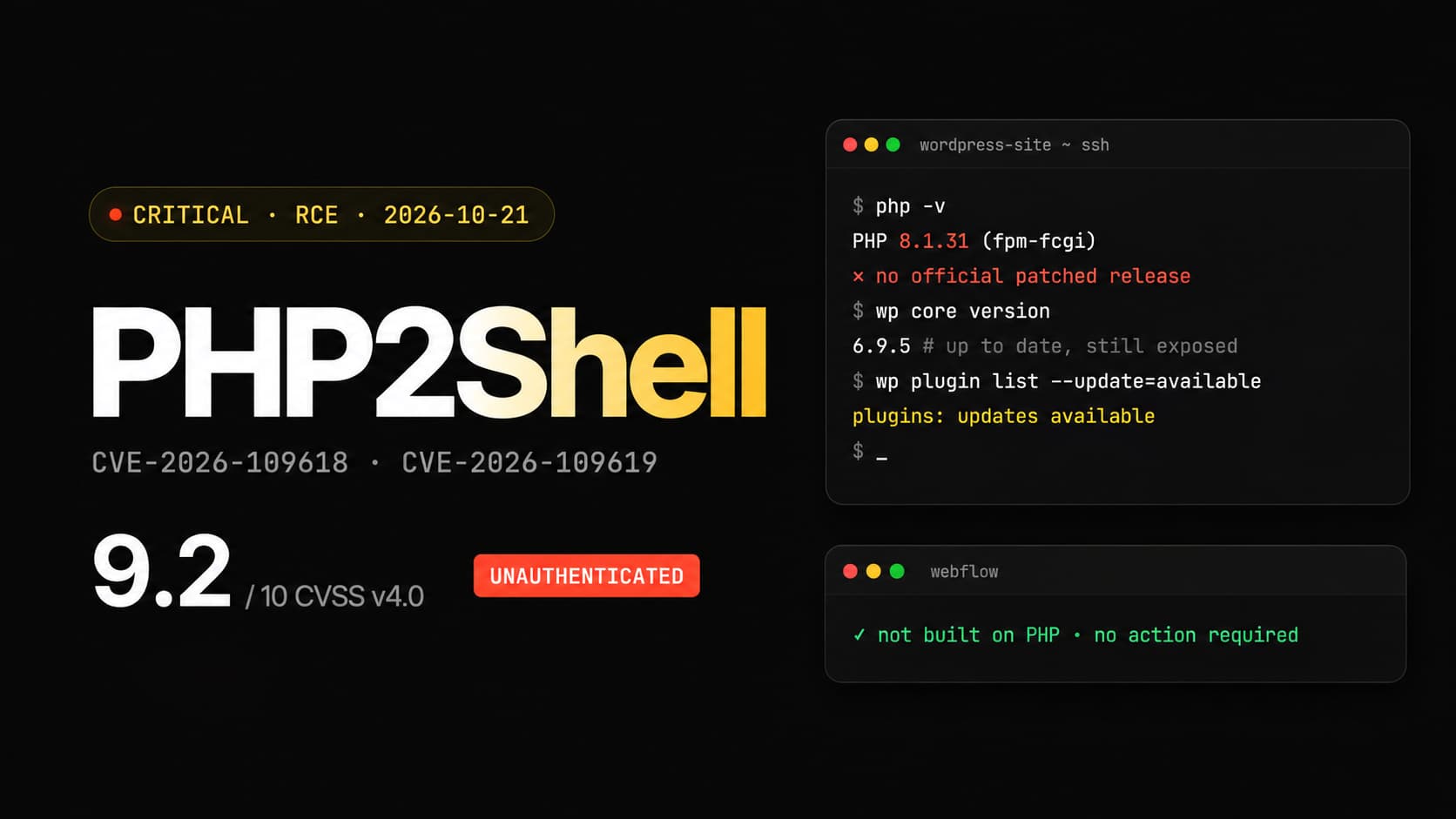
This is probably the change we see most often among our clients using Webflow, and the one that affects our work most directly.
Previously, even the smallest website update required a ticket: create a page, fix a tag, translate some content, then wait for a developer to become available.
Today, we have several options.
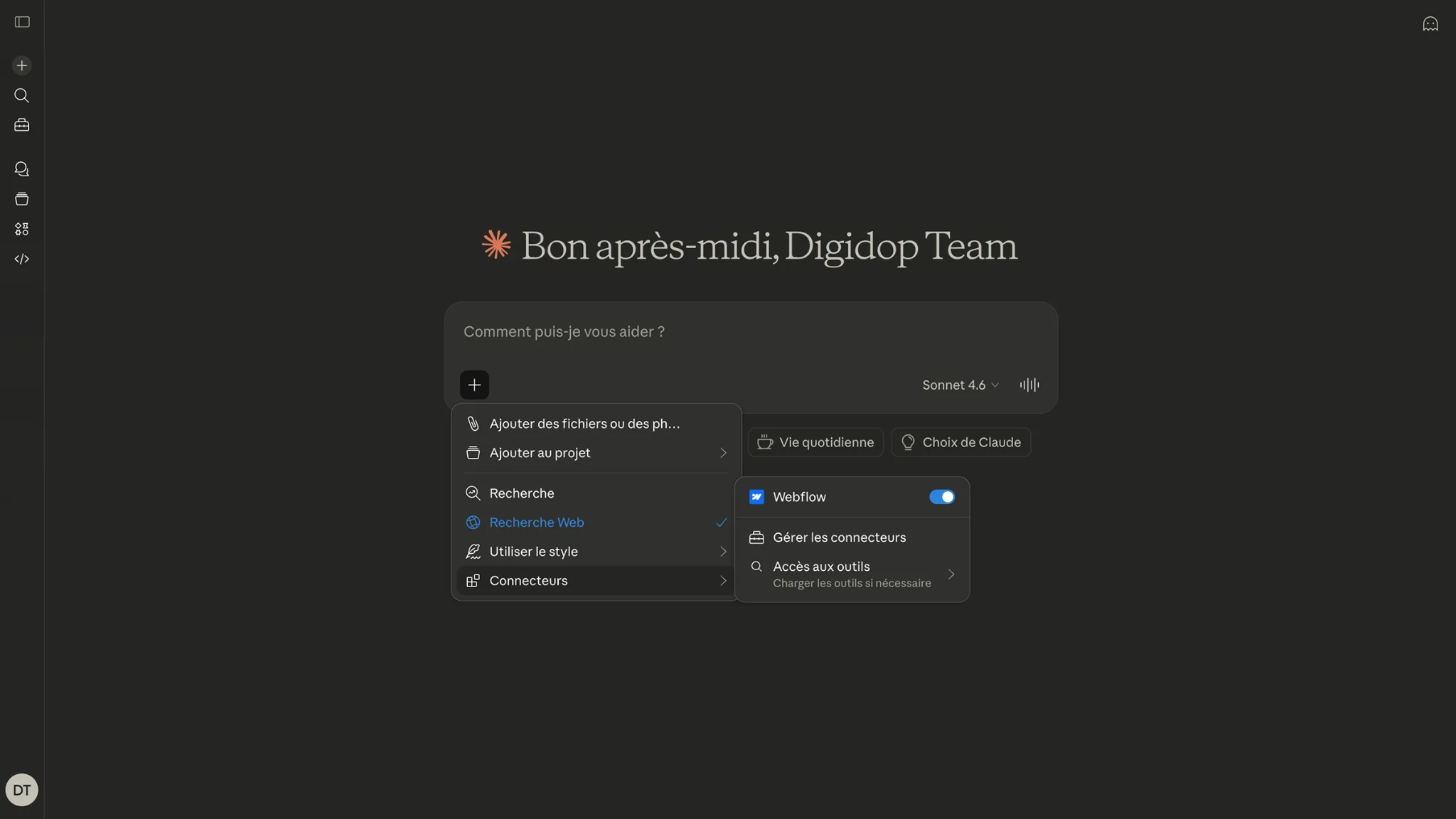
First, with MCP (Model Context Protocol, the standard that connects an AI assistant to software), an LLM like Claude can read and directly modify a Webflow website. We've also published a step-by-step guide to connecting Claude to a Webflow project.
It's the natural next step in the autonomy that a well-built CMS already offers marketing teams on Webflow. But that autonomy depends on a website designed to be modified by AI, with clean components, well-structured CMS collections, and safeguards governing what can be published.
That's exactly what we focus on when helping a team integrate AI into its website: the right tools at the right points in the workflow.
But sometimes we go much further.
More and more clients are asking us to move away from CMS platforms like Webflow toward more agentic stacks with headless CMS, or even no CMS at all: a coded website connected directly to their LLM (ChatGPT, Claude, etc.).
Where the CMS used to be the tool for editing and creating content, the LLM now takes over: less need for a visual interface, and more prompts and vibe coding.
But this isn't a universal rule. It requires a team comfortable with these tools and clear governance over what goes into production. For many marketing teams, a well-structured CMS connected to AI remains the best option. Here are a few criteria to keep in mind when making that choice:
Internal Interfaces and Tools
Another essential change worth discussing is internal tools. Today, marketing teams no longer settle for off-the-shelf software. With AI, they're building their own interfaces tailored to their processes and needs.
Here are a few examples we've seen emerge:
1. Bringing Collective Knowledge Together
Building workflows and shared spaces that centralize conversations, meeting notes, and project histories, so the entire team—or its agents—can query them at any time.
2. Visualizing Performance
Custom dashboards connected to multiple analytics tools (GA4, Search Console, Semrush, HubSpot, etc.) that combine and cross-reference data in one place. And, of course, agents can read that data and surface KPIs with a single prompt whenever needed.
3. Recreating SaaS Interfaces
Directly within an AI tool like Claude, teams can now recreate features from tools such as FigJam, Figma, or Excel, starting from a whiteboard.
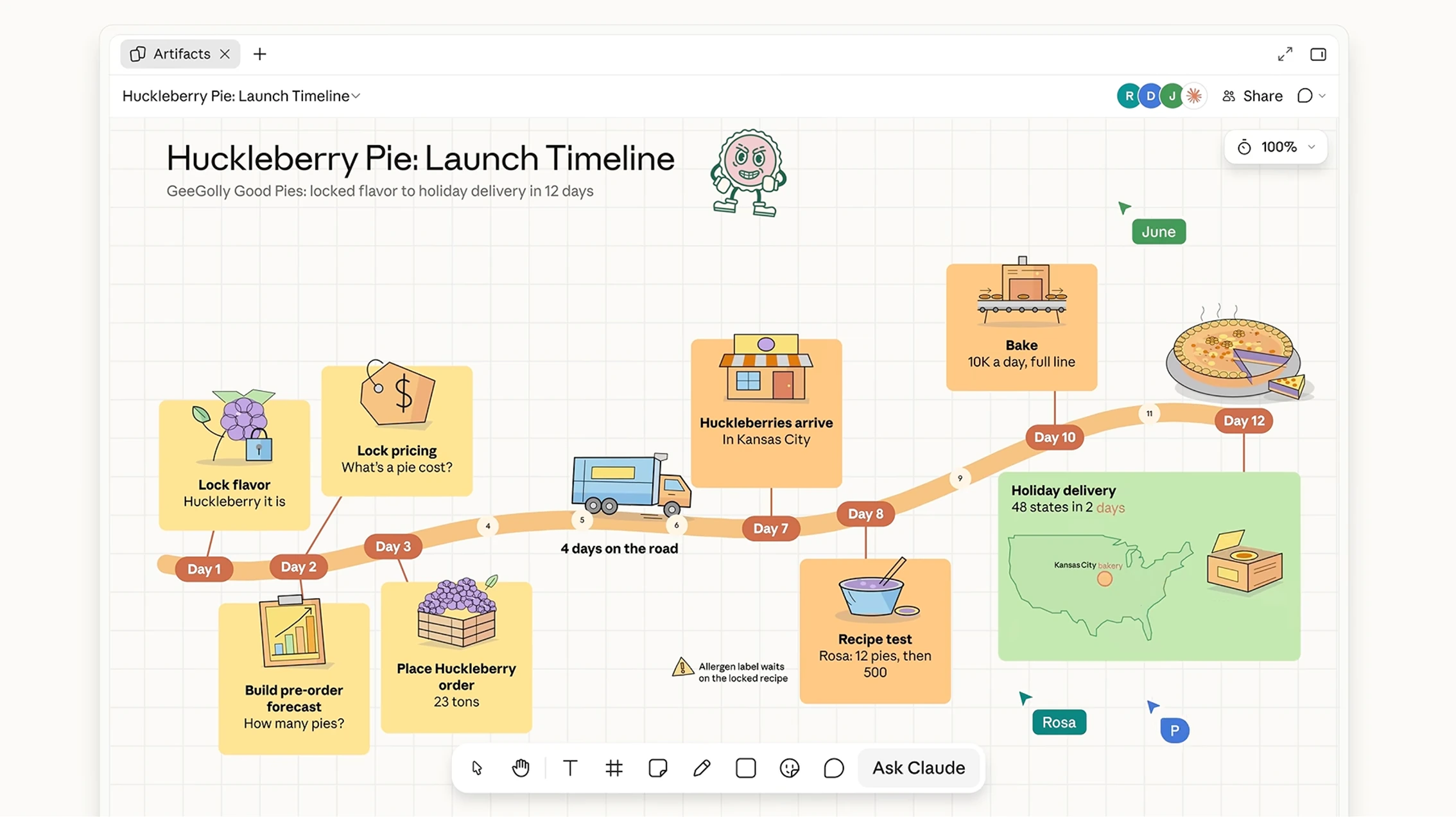
In short: AI hasn't changed what marketing teams do, but it has changed where they spend their time.
{{custom-blog-cta}}
What New Roles Are Emerging in Marketing Teams?
Execution-heavy roles are declining, while roles focused on system design, orchestration, and editing are emerging. AI isn't eliminating marketing; it's changing what we expect from marketers.
The data points in the same direction. According to the AMA's 2026 State of Marketing Careers Report, published in July 2026, SEO specialist job postings fell 15% between 2024 and 2025, while content marketer postings fell 11%. Over the same period, influencer marketer postings increased 18%. The AMA also identifies GEO and AEO specialists and AI workflow designers as growing roles.
One of the most visible roles is the GTM engineer (go-to-market engineer). The title was coined by software company Clay in 2023. It describes someone who builds acquisition systems: data, enrichment, buying signals, and automated sequences. In an analysis of 209 job postings published in August 2026, Onfire found that 95% mentioned AI, LLMs, or agents.
Here are a few examples of new roles we're seeing in marketing teams in the AI era:
So how should you build your marketing team around all this?
Our view: hire for skills, not titles. On a five-person team, the “GTM engineer” is often simply a growth marketer who has learned Clay and n8n. It's not a hard-and-fast rule, but a trendy title without a process behind it creates a job without a clear mission.
In interviews, regardless of the role, the question is no longer “Do you use AI?” Of course everyone does. The real question is “How?” It helps assess how deeply someone has adopted AI and whether they can work within an existing AI-native system—or help build one where it doesn't yet exist.
And the transformation starts with existing positions. According to Jasper, one in three marketers already has AI-related responsibilities built into their role.
In short: fewer people focused purely on execution, and more people who steer the work by designing, editing, and validating it. Above all, people with the right AI mindset! ;)
AI Agents: What Can You Really Delegate to an Agent?
An AI agent is a program that independently carries out a sequence of actions to achieve a goal (researching, writing, publishing, following up, etc.), whereas an assistant responds to one request at a time. We've explained the difference between agentic AI and generative AI in a dedicated article.
Within a marketing team, agents can already handle:
- monitoring trends and producing a weekly summary;
- drafting an article from a brief;
- repurposing content into LinkedIn posts, newsletters, and sales collateral;
- qualifying inbound leads based on CRM data;
- updating CMS content where a CMS is still in use, or updating the site directly otherwise.
What we don't delegate to them is positioning, choosing between competing messages, client relationships, or final approval of anything published under the brand's name.
Let's take a more visual example than copywriting: creating campaign visuals for one of our clients. Their marketing team uses a design-skilled agent that we provided. The agent has access to the brand's knowledge: brand guidelines, design system, and tone of voice. We also added examples of previously published posts and references that match what the team wants to achieve.
Once the agent is configured, a designer creates one or more initial concepts. The agent then takes over to generate variations that closely follow the creative direction and brand, while exploring different messages, layouts, or visuals. The designer selects, refines, and approves the results.
The result: the team can iterate faster and choose from more options for each campaign, while the designer spends more time on creative direction and less on repetitive adaptations.
Our advice: one agent, one task. The more precisely defined an agent's mission is, the better its output. For complex work, use multiple agents or sub-agents: one to draft, one to apply SEO and GEO principles, and another to fact-check and ensure brand consistency.
In short: specialized agents handle the volume; humans retain control over direction and approval.
SEO, GEO, and Websites: How Should Marketing Teams Rethink Visibility?
Your prospects ask ChatGPT, Perplexity, or Gemini questions before visiting your website. Marketing teams therefore need to earn citations in those answers—through GEO, or Generative Engine Optimization—in addition to ranking well on Google.
In a March 2026 interview with CB News, Maylis Crassard (LinkedIn) stated that 94% of B2B buyers use generative AI before even speaking to a salesperson. And companies are adapting: in the January 2026 CMO Survey, 41.5% of respondents were already doing GEO.
At Digidop, 60% to 70% of our inbound leads now come from AI. I can't even remember the last time I spoke to a lead who hadn't used AI to find us, ask for an opinion about our agency, or compare us with competitors.
We'll return to this topic in greater detail later in the article, but it's important to note that this inbound demand is the result of long-term work on our overall brand reputation since the agency was founded: technical foundations, content strategies, client reviews, our YouTube channel, social media, and all the credible third-party sources that talk about us.
And that changes our approach to search visibility quite significantly. Before we dive in, if you're interested in this topic, I recommend following the content we publish on the Vydera blog, our AI-native agency specializing in SEO and GEO.
In practical terms:
1. We no longer target a single search query, but an almost unlimited range of prompts and conversations in which we want to be cited.
2. We don't just aim to be mentioned; we also want these AI systems to perceive our brand positively. When a client asks whether Digidop can be trusted, a consistent positive recommendation matters.
Optimize Your Content.
Start every section with a direct answer, back up claims with sourced figures, and create pages that address buyers' real questions. Learn more in our guide to making your website visible in ChatGPT and Perplexity and in our white paper on AI search engines.
Optimize the Technical Foundations.
Your website also needs to remain readable by agents browsing it on behalf of buyers: clean HTML structure, structured data, and content accessible without JavaScript. That's the topic of our article on preparing your website for AI agents.
Think Beyond Your Website.
AI systems don't just read your pages. To cite a brand and form an opinion about it, they cross-reference what is being said about that brand across the web, including sources you only partly control. This is what we call off-site visibility:
- social media: your own posts, but also what clients and team members say about you;
- review platforms: Google, Trustpilot, G2, or Clutch, depending on your market;
- the press and specialist media;
- authoritative websites in your industry: directories, rankings, comparisons, and forums.
You need to pay attention to all these signals and stay in control wherever possible: monitor conversations, respond to reviews, keep listings and profiles updated, and show up in the sources AI most frequently cites in your market. After all, even a flawless website won't be enough if an outdated comparison or a string of negative reviews tells a different story.
If you're looking for advice or support on these topics, get in touch.
The goal: make your website the source AI cites when a prospect asks a question about your market.
What Mistakes Do Teams Make When Moving to AI?
Most mistakes come from the same instinct: layering AI onto existing ways of working instead of redesigning the workflows themselves.
Here are the ones we encounter most often:
1. Focusing on tools and neglecting processes. Teams buy licenses, everyone experiments independently, and six months later nobody knows what's actually working.
2. Producing more generic content. If AI can write an article without your input, your competitors can produce the same article. Without firsthand insights or a point of view, it won't rank on Google or get cited in AI answers.
3. Neglecting governance. AI governance is the framework that defines who can use which tools and how: approved tools, review levels, and responsibilities. What data can be shared with a tool? Who signs off? What can be published without human review? Without this framework, often formalized in an AI policy, every marketer makes their own decisions and risks accumulate: data leaks, published mistakes, and brand inconsistencies. Jasper also reports that legal, compliance, and brand reviews have become the number-one obstacle to scaling AI.
4. Failing to share knowledge. Tools evolve quickly, and everyone moves forward independently with their own prompts and tricks. The result: what works for one person doesn't benefit the rest of the team. At Digidop, we introduced a weekly AI session where everyone shares their latest workflows, results, and tips. It's also where we establish processes for collaborating with AI across teams.
5. Measuring nothing. That's partly why only 41% of marketers can demonstrate AI's ROI. AI tools themselves are also making measurement easier: since September 2026, the Data plugin in ChatGPT Work, available through ChatGPT Business, can connect to your data sources (data warehouses, BI tools, spreadsheets) to analyze metrics and build dashboards simply by asking questions.
But measurement has changed significantly, as has the nature of the data itself. It's difficult to know exactly which conversation with ChatGPT or Claude led a prospect to your brand. What you can measure, however, is your AI citation rate and brand perception: define specific prompts, test them daily, then extract brand mentions and the language used around them. That's exactly what we do at Vydera.
6. Chasing every new tool. Every week brings a new model, AI product, or feature. Testing is good; overhauling everything after every announcement guarantees you'll never scale. Stable workflows, reviewed regularly, are better than a stack that changes every month.
Here's one quick win we've implemented ourselves: take an existing process and break it down step by step. For each step, identify what can be delegated to AI, with one simple rule: end up with a concrete deliverable or method (a prompt, an agent, an instruction file). Integrate it into the workflow, then move on to the next step.
Where Should You Start to Transform Your Marketing Team?
Start small: two or three pilot workflows, clear rules, and before-and-after measurements, rather than reorganizing the entire team at once. Here's the approach we recommend.
- Map your tasks: List everything the team does over a month, including time spent. Identify repetitive work, tasks requiring judgment, and bottlenecks.
- Choose two or three pilot workflows: Focus on frequent, measurable, low-risk tasks such as monitoring, content repurposing, and reporting.
- Set the rules: Create a short AI policy covering approved tools, restricted data, and approval levels.
- Set up the tools: Use a general-purpose assistant, an automation tool, and connectors to your CRM, CMS, and analytics. Our comparison of n8n, Make, and Zapier can help you choose an automation platform.
- Measure: Track time spent, output volume, perceived quality, and business impact over six to eight weeks.
- Train and expand: Share what works, document prompts and agents, and then move on to the next workflows.
Imagine a B2B SaaS scale-up with a six-person marketing team. First, it lists its most time-consuming weekly tasks, then chooses three to partially delegate to AI: competitive monitoring, turning every article into LinkedIn posts and a newsletter, and website updates. One team member becomes the AI lead and establishes the rules: what AI produces, who reviews it, and what gets published. Two months later, the team compares the time spent before and after, keeps what works, and knows which skills it's missing.
But beyond the methodology, our most important advice is to help teams understand what AI can really do for them. Today, two barriers still slow adoption despite all its benefits:
- 1. The novelty of the technology, and the fear it creates.
- 2. The power of AI and the challenge it poses to our egos: seeing a machine produce in seconds what used to take hours is no small thing.
Once those two barriers are removed, progress accelerates: teams start learning independently, then AI becomes embedded in workflows and eventually across the company, at every level. That's when teams take ownership.
So, Should You Reorganize Your Marketing Team?
Yes—but start with workflows and mindsets. The marketing team of 2026 isn't necessarily smaller: it has more people who design and approve work, and fewer who focus solely on execution. That change doesn't come from the tools themselves, but from how the team works and how it thinks about AI.
When it comes to workflows, teams of every size need rules, measurement, and time to learn. A two-person team doesn't need a GTM engineer, but it does need to know who uses what, who approves what, and what goes live.
When it comes to mindset, awareness is everything. Until teams overcome fear of the new and the challenge to their egos, no tool will be truly adopted.
Our recommendation: before rolling out dozens of AI models, pick one concrete workflow, introduce AI on a small scale for a month, then show your team exactly what it has gained. Those tangible results unlock the next steps: learning, followed by adoption across every level of the company.
FAQ
Will AI Replace Marketing Teams?
No. It is changing their composition. Execution-heavy roles are declining (AMA reports 15% fewer SEO specialist job postings between 2024 and 2025), while roles involving design, editing, and approval are growing. Judgment, positioning, and client relationships remain human responsibilities.
Which AI Tools Should a B2B Marketing Team Use?
More than any individual product, we believe two building blocks matter today:
1. Tools that collect and store data of all kinds: analytics, CRM, CMS, conversations, meeting notes, and so on.
2. AI tools that process and visualize that data as needed: Claude, ChatGPT, or Gemini, for example, can analyze and combine it to produce dashboards, content, and recommendations.
How Much Does AI Cost for a Marketing Team?
The cost falls into three categories:
1. AI assistant licenses for each team member.
2. Usage of running agents and connected APIs, with requests billed according to the number of tokens processed. In other words, pay-as-you-go pricing.
3. Your team's time spent on setup, training, approvals, and so on.
To keep costs under control, especially in the first two categories, we recommend setting usage limits (which can be increased case by case) and selecting models according to the task.
How Should You Train Your Marketing Team to Use AI?
Train people on the team's actual workflows rather than through generic courses. Appoint an AI lead, set aside regular time for experimentation, and share successful prompts and agents in a common workspace.