.jpg)
An SEO audit answers a simple question: what is stopping this site from being found, and where do we start? Most guides pile up dozens of checks with no order. You end up with a thick report that nobody acts on.
In this article, we walk you through the method in the order we recommend, the tools (with verified prices), what we check first on a Webflow site, and how to measure your visibility in ChatGPT, Gemini or Google's AI Overviews in 2026.
Originally published in 2021, fully updated on October 6, 2026.
When should you run an SEO audit?
Four situations call for one:
- before a redesign or a migration, to know which pages bring traffic and avoid losing them along the way;
- after a launch, to check that redirects, indexing and tags followed;
- when organic traffic drops, to find out whether the cause is the site, the demand or the competition;
- when starting a content strategy, to see which queries you are already close to page one for.
For a living site (regular publishing, new pages), one full audit a year is enough, backed by a monthly look at the Search Console reports. Serious problems (deindexed pages, broken redirects) show up there long before the next audit.
What a complete SEO audit includes
| Step | What we check | Main tool |
|---|---|---|
| 1. Search Console data | queries, pages, change in clicks and impressions, branded vs. non-branded | Google Search Console |
| 2. Indexing | which pages are indexed or excluded, and why | Page indexing report, URL Inspection |
| 3. Technical crawl | status codes, redirects, canonicals, tags, orphan pages | Screaming Frog, Ahrefs Webmaster Tools |
| 4. Core Web Vitals | LCP, INP, CLS measured on your real visitors | Search Console, PageSpeed Insights |
| 5. Content | search intent, cannibalization, outdated pages | Search Console, human review |
| 6. Internal linking | links to the pages that matter, depth | crawler |
| 7. Backlinks | referring domains, lost links, anomalies | Ahrefs, Semrush |
| 8. AI visibility | presence in AI Overviews, AI Mode, Copilot, ChatGPT | Search Console, Bing Webmaster Tools, a prompt-tracking tool |
The deliverable you want is a prioritized action list: for each item, the page concerned, the issue found and what to do about it.
The method, step by step
1. Start with Search Console data
Start here, before any paid tool: Google Search Console is the only source with your site's real queries, impressions and clicks on Google.
Compare the last three months with the same period a year earlier, page by page. Three things to look for:
- Pages losing clicks: are they losing positions, or impressions? A page that holds its position but loses impressions points to falling demand, and no SEO fix will bring it back.
- Branded and non-branded queries, separately. Since November 2025, Search Console has a branded queries filter, available to all eligible sites since March 11, 2026. Non-branded traffic is the traffic SEO is supposed to grow.
- Queries in positions 5 to 20 on your service pages: they are the fastest wins.
2. Check indexing
The Search Console Page indexing report shows which URLs Google has crawled and indexed, and why it excludes others. Don't try to get everything indexed: pages excluded on purpose (redirects, noindex pages) are normal. Worry when an important page sits in the exclusions, or when the "Discovered, currently not indexed" count keeps growing.
For a single page, the URL Inspection tool tells you whether it is indexed, which canonical Google picked and when it last crawled it.
YouTube video3. Run a technical crawl
A crawler goes through your site the way a search engine bot does. In the export, look at these in order:
- error pages (4xx, 5xx) that still receive internal links;
- redirect chains (A to B to C) and internal links pointing to a redirect;
- canonicals pointing to a different page than expected;
- missing or duplicate titles and meta descriptions, pages with no H1 or several H1s;
- pages listed in the sitemap that no internal link reaches (orphan pages).
On title length, Google sets no character limit: it truncates titles to fit the screen. Aim for a short, unique, descriptive title rather than counting characters.
4. Measure Core Web Vitals
The three metrics and their thresholds, according to web.dev:
| Metric | What it measures | "Good" if |
|---|---|---|
| LCP (Largest Contentful Paint) | when the largest visible element renders | ≤ 2.5 s |
| INP (Interaction to Next Paint) | responsiveness to clicks and typing | ≤ 200 ms |
| CLS (Cumulative Layout Shift) | layout stability | ≤ 0.1 |
INP replaced FID on March 12, 2024: an audit that still talks about FID is out of date. The thresholds apply to the 75th percentile of page loads, on mobile and desktop. So look at field data first (the Core Web Vitals report in Search Console, the top section of PageSpeed Insights), and only then at the Lighthouse lab score.
Two tools from older guides are gone: the Mobile-Friendly Test and the Search Console Mobile Usability report were retired on December 1, 2023. And in October 2023 Google announced that mobile-first indexing was complete: it crawls the mobile version of your pages. Check mobile rendering with Lighthouse, or simply on a phone.
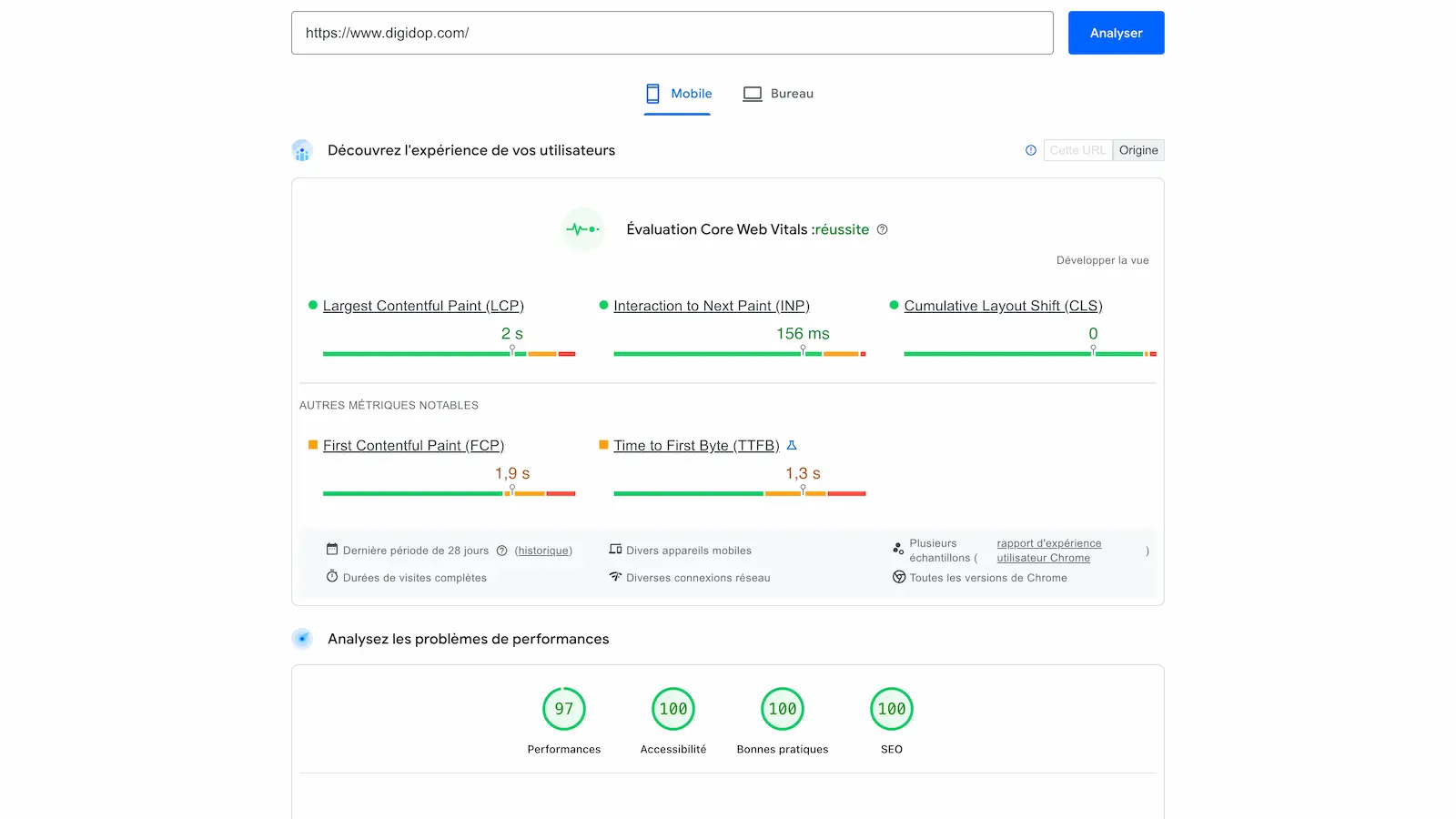
Sample PageSpeed Insights report on digidop.com (2025 capture). For the fixes, see our article on website loading speed.
5. Audit the content
This is the longest step, and no tool does it for you. For each page that matters:
- Does it match the intent of the target query? A service page ranking for an informational query (or the reverse) will hit a ceiling.
- Are several pages competing for the same query? In Search Console, filter on the query and count the URLs getting impressions. If the homepage, a service page and a blog post take turns, that's cannibalization: pick one page and point the others to it.
- Is the content still accurate? Dates, prices, tool names, screenshots: outdated content loses the reader's trust before it loses rankings.
- Is duplicate content (the same text on several URLs) handled with a canonical tag or a merge?
6. Check internal linking
Internal links tell search engines which pages matter. Make sure your service pages get links from the articles that discuss them, with descriptive anchors, and that no important page is orphaned. The Search Console Links report lists your most internally linked pages: if your service pages are missing from it, that's your first job.
7. Review backlinks, without paranoia
List the domains linking to you, recently lost links (often to pages deleted without a redirect) and the pages that attract links. Recovering a lost link with a 301 redirect is the best return on effort in this step.
On "toxic" links, Google is clear: most sites don't need the disavow tool. It only makes sense if you have a lot of artificial links and they have caused, or are likely to cause, a manual action.
Auditing your visibility in AI search
This step was missing from audits two years ago. AI answers (AI Overviews and AI Mode on Google, Copilot at Microsoft, ChatGPT, Perplexity) cite sources: the question is whether you are one of them.
What Google and Bing now report
- Google Search Console has offered a generative AI performance report since June 2026, rolled out to all websites as of August 31, 2026 (provided they have enough impressions). It shows how often your URLs appear in AI Overviews and AI Mode, by page, country and device. Note that it only counts impressions, not clicks. The same data is still included in the main performance report.
- Bing Webmaster Tools launched an AI Performance report in February 2026 (public preview), which counts how often your pages are cited in Copilot and Bing's AI summaries.
Both reports are free. Add your site to Bing Webmaster Tools if you haven't already.
What to check on the site
Google says so in its documentation on AI features in Search: there are no additional requirements to appear in AI Overviews or AI Mode, and no special file or markup to add. The fundamentals are enough, and the audit has already covered them: crawling allowed by robots.txt and by your CDN or host, important content available as text, structured data that matches the visible text.
For ChatGPT, check your robots.txt: OpenAI separates OAI-SearchBot, which surfaces your site in ChatGPT search answers, from GPTBot, which collects training data. Blocking GPTBot does not keep you out of ChatGPT answers; blocking OAI-SearchBot does.
Track the prompts that matter
The Google and Bing reports tell you whether you appear, not for which questions. For that you need a tool that regularly asks AI engines a list of prompts ("which agency for…", "best tool for…") and records who gets cited. Semrush includes this in its "SEO + AI Search" plans, and since June 29, 2026 Webflow offers Webflow AEO to Enterprise customers. For what to change on your pages next, see our article on visibility in ChatGPT and AI answers.
On our own site, we track 18 prompts in France: based on our internal tracking, Digidop is the most cited Webflow agency, with a 31.4% citation rate (measured from September 5 to October 4, 2026). Without that tracking we wouldn't know which prompts we are cited for: neither Google Analytics nor Search Console tells you.
On a Webflow site: what we check first
Webflow handles a lot by default (SSL, sitemap, tags), but a few settings make the difference. They come from our Webflow SEO checklist; we recommend checking them in this order, because the first ones can skew the rest of the audit.
- The webflow.io subdomain must not be indexed, or the staging version duplicates the whole site. The setting is in Site settings → SEO → Indexing (Webflow help).
- The global canonical tag is set in Site settings → SEO → Global canonical tag URL, with the right protocol and the right domain (with or without
www) (Webflow help). - After a migration or a redesign, 301 redirects are managed in Site settings → Publishing → 301 redirects, with CSV import and export (Webflow help). We compare the list with the old URLs that had traffic or links.
- The auto-generated sitemap includes CMS Collection pages, and sometimes pages that don't belong there (thank-you pages, utility pages, empty categories). For those, the Sitemap indexing toggle in page settings adds a
noindexand removes the page from the sitemap (Webflow help). - On a multilingual site with Webflow Localization, hreflang tags are generated automatically when the option is on in Localize → SEO; with a custom sitemap, you have to add them yourself (Webflow help).
For a sense of scale, based on our internal tracking, the October 5, 2026 crawl of digidop.com flagged almost nothing: 1,444 URLs returning 200, complete hreflang and canonical tags. On a well-configured Webflow site, most of the audit is about content, internal links and AI visibility rather than technical issues.
Guide: Mastering on-page SEO in 2026
Read the guideHow to prioritize SEO audit recommendations
Rate each action on two criteria: its impact on the pages that bring business (services, contact, pages that generate leads) and the effort it takes. Then work in this order:
- anything blocking indexing or crawling of important pages (a forgotten
noindex, a broken redirect, an indexed staging site); - service pages in positions 5 to 20: title, content, internal links;
- cannibalization between pages targeting the same query;
- Core Web Vitals rated "poor" on the most visited templates;
- the rest: content updates, lost links, markup details.
One rule that saves a lot of disappointment: don't judge the audit by total traffic. If the lost traffic came from off-target articles, winning it back won't bring in business. Track non-branded clicks on service pages, and contact requests.
How much does an SEO audit cost?
There is no reliable benchmark price for an agency audit: it depends on the number of pages, the number of languages, how deep the content analysis goes and whether it covers AI visibility. Be wary of a fixed-price audit sold without any questions about your site: it is often a tool export.
If you do it yourself, here is what the tools cost (prices checked on October 6, 2026):
| Tool | What it brings | Price |
|---|---|---|
| Google Search Console | queries, indexing, Core Web Vitals, AI impressions | free |
| PageSpeed Insights | Core Web Vitals for a page, field and lab | free |
| Bing Webmaster Tools | Bing indexing, citations in Copilot | free |
| Ahrefs Webmaster Tools | site audit and backlinks for your verified sites | free (5,000 crawl credits per month per project) |
| Screaming Frog SEO Spider | full technical crawl | free up to 500 URLs, then $279 per year per user |
| Semrush | site audit, rankings, competitors; AI tracking in the Starter plan | as shown in Europe: SEO plan €134/month, Starter "SEO + AI Search" €190/month (monthly billing); prices vary by region |
For a site with a few hundred pages, the free tools cover the essentials. A paid crawler pays off beyond 500 URLs, and a tool like Semrush once you want to track competitors and rankings over time.
Our take
A good SEO audit fits on one page of actions. Many reports list hundreds of "errors" flagged by a tool, often mere warnings with no effect on rankings. What matters is tying each finding to a page that brings business and to a dated action.
Second conviction: in 2026, an audit that stops at Google is incomplete. The AI reports in Search Console and Bing are free, and they already show whether your pages are used as sources for generated answers.
For the SEO audit and AI visibility tracking, we work with our partner agency Vydera, an AI-native visibility agency. On our side, the site audit (UX, technical, CMS) is part of our strategy and consulting work, and ongoing site improvements are covered by our Growth & Performance offer.
Frequently asked questions
What does a complete SEO audit include?
A review of Search Console data, an indexing check, a technical crawl (status codes, redirects, canonicals, tags), field measurement of Core Web Vitals, a content audit (intent, cannibalization, outdated content), internal linking, backlinks and, since 2026, visibility in AI search. The deliverable is a prioritized action list.
How often should you run an SEO audit?
One full audit a year for a site that publishes regularly, plus a monthly check of the Search Console reports. Add an audit before and after every redesign or migration.
Can you run an SEO audit with free tools?
Mostly, yes: Search Console, PageSpeed Insights, Bing Webmaster Tools, Ahrefs Webmaster Tools and the free version of Screaming Frog (500 URLs) cover indexing, technical health, performance and part of your backlinks. Paid tools mainly add competitor analysis and rank tracking.
How do you prioritize SEO audit recommendations?
First whatever blocks indexing of important pages, then service pages close to page one, cannibalization, Core Web Vitals on the most visited templates, and finally the rest. Rate each action on its impact on the pages that bring business and the effort it requires.
How do you audit your visibility in AI search?
Check the generative AI performance report in Search Console (impressions in AI Overviews and AI Mode) and the AI Performance report in Bing Webmaster Tools (citations in Copilot). Make sure your robots.txt and CDN let AI crawlers through, especially OAI-SearchBot for ChatGPT. To know which questions you are cited for, you need a prompt-tracking tool.
How much does an SEO audit cost?
Done in-house, it can cost nothing but time: the core tools are free. A crawler like Screaming Frog costs $279 a year beyond 500 URLs. With an agency, the price depends on the number of pages and languages and how deep the analysis goes: ask for a quote that spells out the scope and the deliverable.
 Preview Newsletter